
A trailing stop is a stop-loss that moves with the trade. As the price climbs, the stop climbs along with it, locking in more and more of the gain. The stop never moves down — only up.
The recipe
A trailing stop has two ingredients:
- Trigger — how far in profit the trade has to be before the trailing stop "wakes up." Until the trigger is hit, your original stop-loss is what's protecting the trade.
- Trail — once the trailing stop is active, how far behind the peak price it sits.
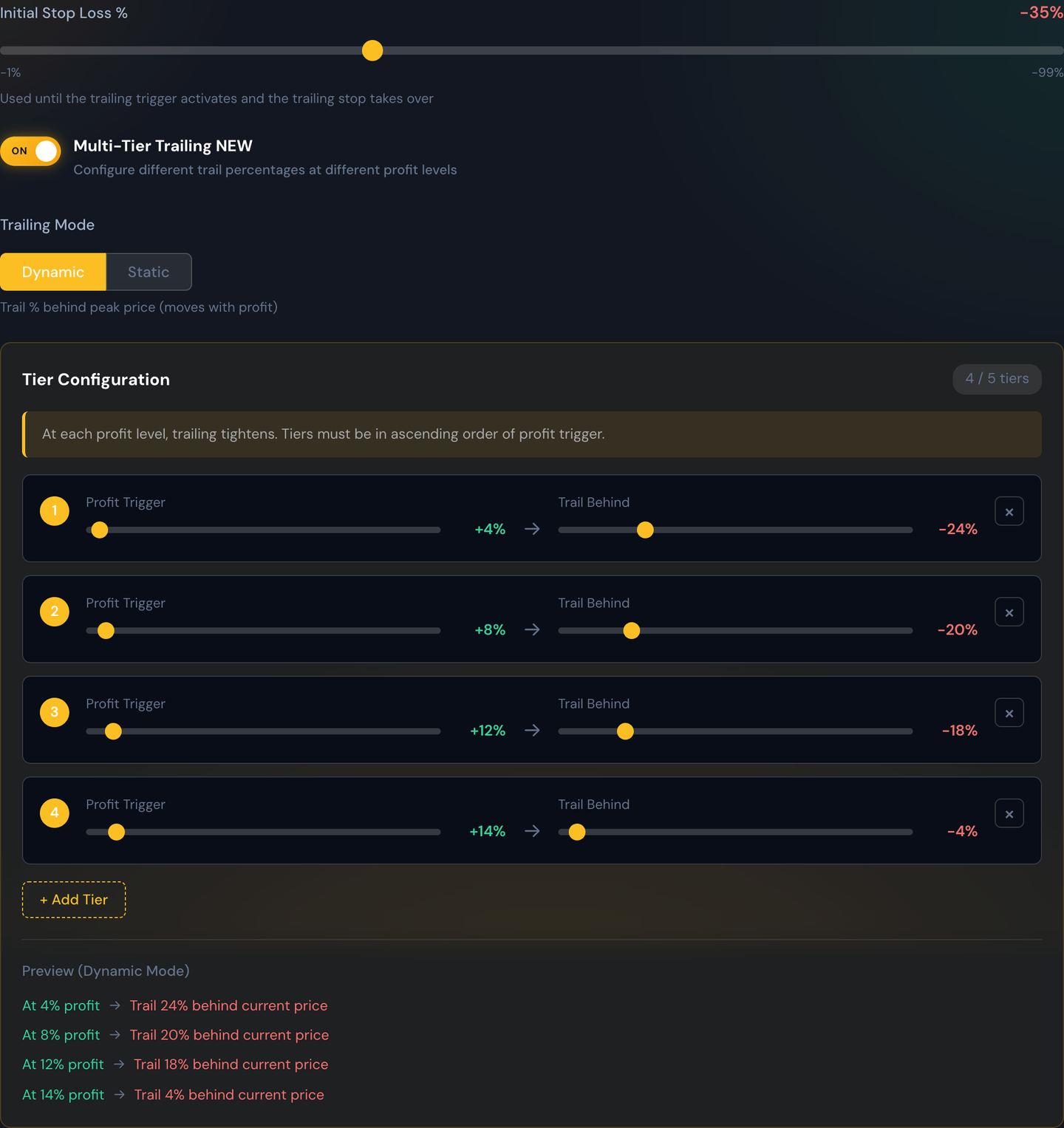
Worked example
You enter a trade at $1.00. You set a trailing stop with a 20% trigger and a 10% trail:
- The price has to climb to at least $1.20 before the trailing stop kicks in. Below $1.20, your normal stop-loss protects the trade.
- The price climbs to $1.30. The trailing stop activates and sits 10% below that, at $1.17.
- The price keeps climbing to $1.50. The trail follows: 10% below $1.50 is $1.35.
- The price now pulls back. Once it falls to $1.35, the trade closes — you book a +35% win on a trade that was never up more than 50%.
The point: a trailing stop lets you stay in winners as long as they keep winning, and steps you out the moment they reverse meaningfully.
Initial Stop Loss %
The stop that protects the trade before the trailing stop wakes up. It sits at the top of the trailing settings and is measured from your entry price, exactly like an ordinary stop-loss.
This is a real stop and it does real work. A trade that goes straight against you from the open never reaches the trigger, so the trailing stop never activates and the Initial Stop Loss is the only thing standing between you and a bigger loss.
Example
You enter at $1.00 with an Initial Stop Loss of 25% and a 20% trigger. Your stop is at $0.75 the moment the trade fills. If the price drops to $0.75 you're out at −25% and the trailing stop never came into it. If instead the price climbs to $1.20, the trigger fires, the trail takes over, and the $0.75 stop is replaced.
Trailing Mode: Dynamic vs Static
Once the trail is active, this decides what it measures from. Both modes tighten your protection; they just anchor to different prices.
Dynamic — the stop follows the peak price the trade has reached, staying a set percentage behind it. As the price makes new highs, the stop climbs with them. This is the mode most people mean when they say "trailing stop." Its control is the Stop Multiplier % — how far behind the high to sit.
Static — the stop is a fixed percentage from your entry price and doesn't move once it's set. Its control is the Static Trailing %. It's really a tightening: the trigger fires, your original wide stop is replaced by a snugger one, and then it holds still.
Example
You enter at $1.00 with a 20% trigger. The price runs to $1.50, then pulls back.
- Dynamic, 10% multiplier: at the $1.50 peak the stop sits at $1.35. You exit around $1.35 for +35%.
- Static, 10%: when the trigger fired the stop moved to $0.90 (10% below your $1.00 entry) and stayed there. The pullback from $1.50 doesn't touch it, so you're still in the trade — and still risking a fall back to $0.90.
Tip
Use Dynamic when you want to bank a big move — it's what captures a runner. Use Static in choppy conditions, where a dynamic trail keeps getting clipped on small pullbacks and stops you out of trades that later work.
Break-Even Protection
An extra safety step you can add on top of the trail: move the stop up to your entry price, so a trade that has been meaningfully in profit can no longer become a loss.
Turn on Break-Even Protection and you choose when it happens:
- At Trailing Trigger — the stop jumps to your entry the moment the trailing stop activates. Simple, and tied to a number you've already set.
- At Specific Profit % — you set a separate Break-Even Trigger percentage, independent of the trailing trigger. Use this when you want break-even protection earlier (or later) than the trail itself.
Example
You enter at $1.00 with a 25% initial stop, a 20% trailing trigger, and Break-Even Protection set to At Specific Profit % → 10%. At $1.10 your stop jumps from $0.75 up to $1.00 — the trade is now free. At $1.20 the trailing stop activates and takes over from there. The worst outcome after $1.10 is breaking even, minus fees.
Note
Break-even is the entry price, not the entry price plus costs. Commissions and the bid/ask spread mean a break-even exit is usually a very small loss in dollars. See Fees & Slippage.
Note
These options apply to the single-trail setup. Multi-Tier Trailing replaces them with its own ladder of profit levels and trail percentages, so the trigger, multiplier and break-even boxes disappear while it's on.
On futures
On a futures contract, the trigger and the trail are distances, not percentages. Your strategy sets them in points or ticks, and the trade card shows them back to you in whichever unit you picked for Futures P&L Unit in Dashboard Settings — ticks unless you've changed it.
A percentage would tell you nothing here. A one-contract /NQ trade that loses $705 has moved the index about 0.1% — but it has moved 141 ticks, and that's the number worth reading. So a futures trailing card reads "Fixed Stop −140t" and "Trailing 32t behind", never "−30%".
Example. You're short one /NQ at 30,162.25 with a 35-point stop. Phase 1 on the card reads Fixed Stop −140t, because 35 points is 140 ticks on NQ at a quarter-point a tick. If the trail wakes up and ratchets your stop down to 30,130, Phase 2 reads Stop +129t — the trade is now locked in at a profit, and the sign tells you so at a glance.
Note
On some older futures trades a box shows a dash (—) instead of a number. That means we didn't record that exact distance at the time, so the card leaves it blank rather than showing you a figure it can't stand behind. Everything the card does show is measured from your real fill and your real stop.
Adding to a trailing-stop trade
You can add contracts to a trade that's running a trailing stop — either by pressing Scale In on the trade card yourself, or by letting a repeat alert average into it (that part is governed by your Allow Averaging switch). What happens to your stop afterwards depends on whether the trail has woken up yet.
Before the trigger is reached, your stop is just a percentage below your entry price. So when your entry moves, the stop moves with it — down if you averaged down, up if you averaged up. It keeps meaning the same thing: this far below what I actually paid. The trigger re-bases off your new average too.
After the trail is active, your stop is following the highest price the trade has reached — not your entry. That peak didn't change just because you bought more contracts, so the stop stays exactly where it had ratcheted to. Averaging in can never hand back a gain you've already locked in.
Example
You're long 2 SPY calls at $2.40 with a 25% stop (sitting at $1.80), a 20% trigger and a 10% trail. The price dips to $2.10 before the trail ever wakes up and you add 2 more contracts. Your entry blends to $2.25 and the stop follows down to $1.69 — still 25% below what you paid. Now picture the other case: the trade instead ran to $3.20, waking the trail and ratcheting your stop up to $2.88. You add 2 more at $3.10, blending your entry down to $2.75. The stop stays at $2.88, guarding the peak — so all four contracts are protected well above break-even.
A few more things worth knowing:
- A stop you set by hand is never overwritten. If you moved the stop yourself, or your profit lock raised it, that price stays put.
- Cleared tiers stay cleared. On Multi-Tier Trailing, averaging up drops your profit percentage on paper, but you keep the tighter trail you'd already earned.
- You're never left unprotected. The stop is briefly swapped out to cover the extra contracts. If the order to add is refused, your original stop goes straight back where it was and the trade is left alone.
- It doesn't use up a trade slot. Adding to a position isn't opening a new one, so it doesn't count against your Trade Limits.
This works on single-contract trades, on your live broker and on Paper Trading. Futures strategies take a position once and turn away repeat alerts, and spreads aren't included — a trailing stop follows one contract's price, not a spread's combined net price.
When trailing stops shine
- Trending markets where moves keep extending.
- When you want to participate in a big move without setting an unrealistically high profit target.
When they can frustrate
- Choppy, sideways markets — the trail keeps getting clipped on tiny pullbacks.
Tip
Use Backtest to compare a trailing stop against a flat profit target on the same alerts. The right pick depends on the kind of moves your alerts tend to produce.