
The Symbol Filters box at the top of a strategy's Filters tab decides which underlyings a strategy is allowed to trade. It's a plain yes-or-no screen applied before anything else happens — an alert that doesn't pass is ignored, and no trade is opened.
There are four controls here.
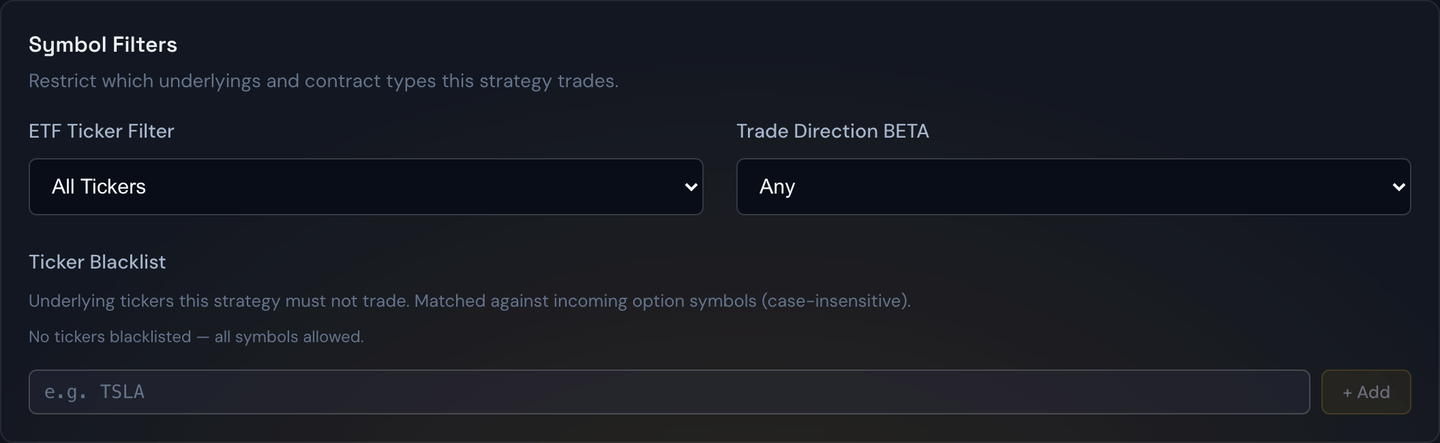
ETF Ticker Filter
Restricts the strategy to a single ETF:
- All Tickers — trade whatever the alert source sends (the default).
- SPY Only — ignore every alert that isn't on SPY.
- QQQ Only — ignore every alert that isn't on QQQ.
Example
Your alert source sends signals on SPY, QQQ and IWM. You believe your rules work on SPY but not on the others. Set SPY Only and the QQQ and IWM alerts are quietly skipped.
Tip
This pairs well with running two strategies on the same source — one set to SPY Only with a tight stop, one set to QQQ Only with a wider one — so each ticker gets rules that suit how it actually moves. Give them different Priority numbers so they don't compete for the same dollar.
Trade Direction
Restricts the strategy to calls only, puts only, or both. It's covered in full under Trade Limits.
Ticker Blacklist
A list of underlyings this strategy must never trade. Type a ticker and press enter to add it; click the × on a chip to remove it. Capitalization doesn't matter — nvda and NVDA are the same entry.
This is the opposite tool to the ETF filter. The ETF filter is an allow list of one; the blacklist is a deny list of as many names as you like, leaving everything else permitted.
Example
Your source alerts on individual stocks and you've decided you never want this strategy touching earnings-week movers. Add NVDA, TSLA and AMD to the blacklist. Every other ticker the source sends still trades normally; those three are always skipped.
Note
The blacklist matches the underlying ticker exactly, not the full option symbol — so blacklisting
SPYblocks every SPY option, at any strike and any expiration, but does not blockSPYG. EnteringSPXalso coversSPXW, the symbol SPX options trade under at the broker.
Ticker Whitelist
The reverse of the blacklist: a list of the only underlyings this strategy may trade. It works the same way — type a ticker and press enter to add it, click the × on a chip to remove it, capitalization doesn't matter.
- Empty — the whitelist is off, and every ticker is allowed (the default).
- One or more tickers — every alert on a ticker that isn't listed is skipped.
Matching is exact on the underlying, just like the blacklist: whitelisting SPY allows every SPY option but not SPYG, and SPX also covers SPXW.
Example
Your source alerts on dozens of stocks, but you only want this strategy trading the big three indexes. Add SPY, QQQ and SPX to the whitelist. Alerts on those — including SPXW options — trade normally; everything else is skipped.
Note
If a ticker is on both lists, the blacklist wins and it's skipped.
How the four work together
All four must pass. They're independent screens, not alternatives:
Example
You set the ETF Ticker Filter to SPY Only, Trade Direction to Puts, and put SPY on the blacklist. Nothing will ever trade — the blacklist rejects the only ticker the ETF filter allows. The same happens if your whitelist doesn't include SPY. If a strategy has gone completely quiet, check here first.
Tip
These filters decide which symbols are eligible. The Alert Quality Filters below them decide which alerts on those symbols are good enough. Symbol filters first, quality filters second — an alert has to clear both.
Symbol filters are saved per strategy and travel in a share code, so a setup you send to a friend arrives with the same allow and deny lists you're running.