
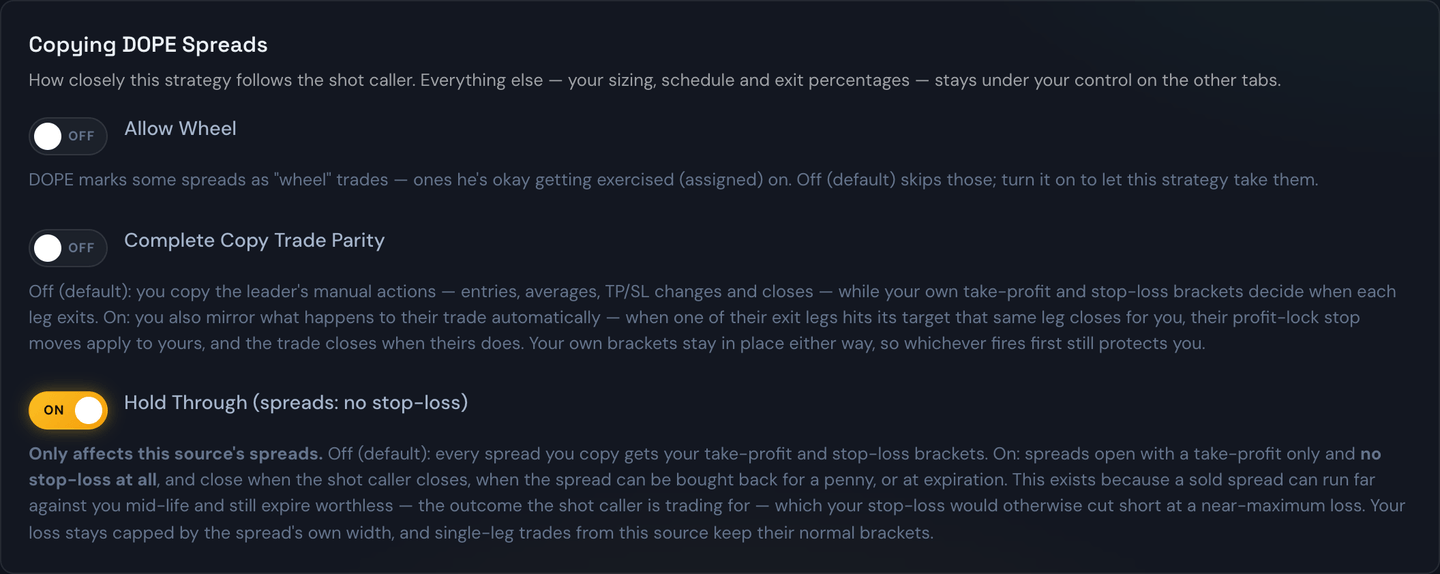
Hold Through is a toggle on a strategy's Copy Trade tab. It changes one thing, and only one thing: what happens to the positions that shot caller sells — credit spreads and single-leg sold options alike.
- Off (the default) — everything you copy gets your own take-profit and stop-loss brackets, just like any other trade.
- On — sold positions get no take-profit and no stop-loss at all. Nothing rests at the broker. They fully copy the shot caller: the position closes when the shot caller closes it, when you close it yourself, or at expiration — worthless or not, keeping the full premium either way. End-of-day swing close doesn't apply to these positions either, since there's no bracket for it to act on.
Trades the source buys are untouched either way — they keep your normal brackets.
Why anyone would turn off a stop-loss
This sounds reckless until you know how a sold position behaves.
When a shot caller sells premium, they're being paid up front and betting it expires worthless. The thing is, a position that's going to end up worthless very often looks terrible in the middle of its life. The underlying wanders toward the strike, the quoted price balloons, and then it drains back to nothing as expiration approaches. That round trip is normal, and it's the whole trade.
A stop-loss can't tell that apart from a losing trade. It fires at the ugliest point — usually near the maximum loss — and takes you out of a position that was on its way to a full win.
Example
The shot caller sells a $5-wide put spread on SPX for a $1.00 credit. Two days later the market dips and the spread is quoted at $3.80. With a normal stop-loss you'd have been taken out there for a large loss. The market steadies over the next three days, the spread expires worthless, and the shot caller keeps the entire $1.00 credit. With Hold Through on, so do you.
There is a second reason the percentages simply don't work here. A stop-loss is expressed as a percentage move against you, and the loosest this system allows is −99%. Going from a $0.61 credit to $5.00 mid-life is a −719% move. No stop-loss percentage both protects a bought position and survives a sold one.
How far your loss can actually go — and it depends on what was sold
This is the part to be sure of before turning it on, because the answer is not the same for the two shapes:
| What was sold | Worst case with no stop |
|---|---|
| Credit spread (two legs) | Capped by structure: the distance between the strikes, minus the credit. A $5-wide spread sold for $1.00 caps at $4.00 per spread. |
| Single-leg sold PUT | The strike, minus the credit — you can be assigned the shares. A 37.5 put sold for $1.08 risks about $3,642 per contract if the underlying goes to zero. |
| Single-leg sold CALL, uncovered | Open-ended. There is no ceiling on how far the underlying can rise. |
A spread's cap exists in the structure of the trade itself, whether or not you have a stop. A single leg has no such structure — which is why single-leg sold options carry a second gate.
The second gate on single-leg sold options
A single-leg sold position from a shot caller is usually a wheel trade: they are content to be assigned and to run the shares through the wheel. Those alerts are flagged, and they require Allow Wheel to be on as well.
So a single-leg short with no stop-loss means you have opted in twice — once to accept assignment (Allow Wheel), once to run it without a stop (Hold Through). Neither is on by default, and neither can be turned on by the shot caller on your behalf.
Warning
Cap or no cap, the maximum is a real number and you should be comfortable with it before turning this on. Size these positions on what you could lose at the ceiling, not on the credit you collect. Your daily Killswitch limits still apply and will still stop the strategy for the day.
Your broker has an opinion too. Selling an uncovered option needs the matching options approval level on your account, and without it your broker will reject the entry — the trade card will say so. Spreads clear at a lower level, so this only affects single-leg shorts.
How it interacts with your other settings
- Your take-profit and stop-loss sliders disappear on the Risk & Orders tab, replaced by a note explaining that this source's sold positions have no TP/SL to set. Turning Hold Through back off brings the sliders — and whatever values were on them before — right back; nothing you had set is lost while it's on.
- Exit legs still split the position. If you use Multi-Leg Exits, the legs continue to decide how the position is divided — which is what lets the shot caller close part of it — but the TP/SL columns are hidden the same way, since neither applies. Only the allocation percentages (and adding/removing legs) still matter.
- Trailing stops don't apply. A trailing stop is a stop-loss, so there's nothing for it to do on a held-through position.
- You can still close by hand at any time. The Close button on the trade card, and Flatten All, both work exactly as normal. So do the killswitch and the time-limit exit. End-of-day swing close does not apply to a held-through position — there's no bracket for it to close early.
Reading a held-through trade on the card
A sold position is marked STO on its trade card, and a spread is marked CREDIT; expand a spread and each wing shows its own BTO or STO beside the contract. A held-through trade shows HOLD, and both its stop and its target read None — there is genuinely nothing resting at the broker for either one.
Remember that a sold position profits as its price falls. On an STO card, an exit below your entry is a win, which is the opposite of how a bought trade reads.
Where the toggle is — and why you might not see it
Hold Through only appears when three things are true at once:
- The shot caller has opted in to offering it on that source.
- Your strategy is set to mirror their exits — that is, the source sends both entry and exit signals rather than entry only.
- Your bot is a recent enough version to support it.
If any of those isn't true, the toggle isn't shown, because the setting would have nothing to act on. It's saved per strategy, so you can run one strategy holding through and another with normal brackets on the same source.
Tip
If you're not sure, leave it off. Off is the ordinary behavior, and it's the setting that keeps a stop-loss under every trade. Turn it on once you've watched a few of that source's positions run their full course and you understand the shape of them.
Measuring it on past trades
The switch is also on the Backtest page's Position tab, so you can watch a few of that source's positions run their full course without putting money behind it. Turn on Copy Trade Exits and Hold Through together and the run shows what the sold positions actually did with no bracket under them.
Read those results as a floor, not a forecast. The backtest only sees as far as our minute-by-minute prices for that contract reach, and these positions are often held for weeks. Where the shot caller's own close is on record, the trade settles at his price and the number is exact. Where it isn't, the trade ends at the last price we have, and that isn't a real outcome. The note under your results says how many of each you got.
Tip
If that note says any are unresolved, shorten the date range to a stretch with better coverage before drawing a conclusion from it.