
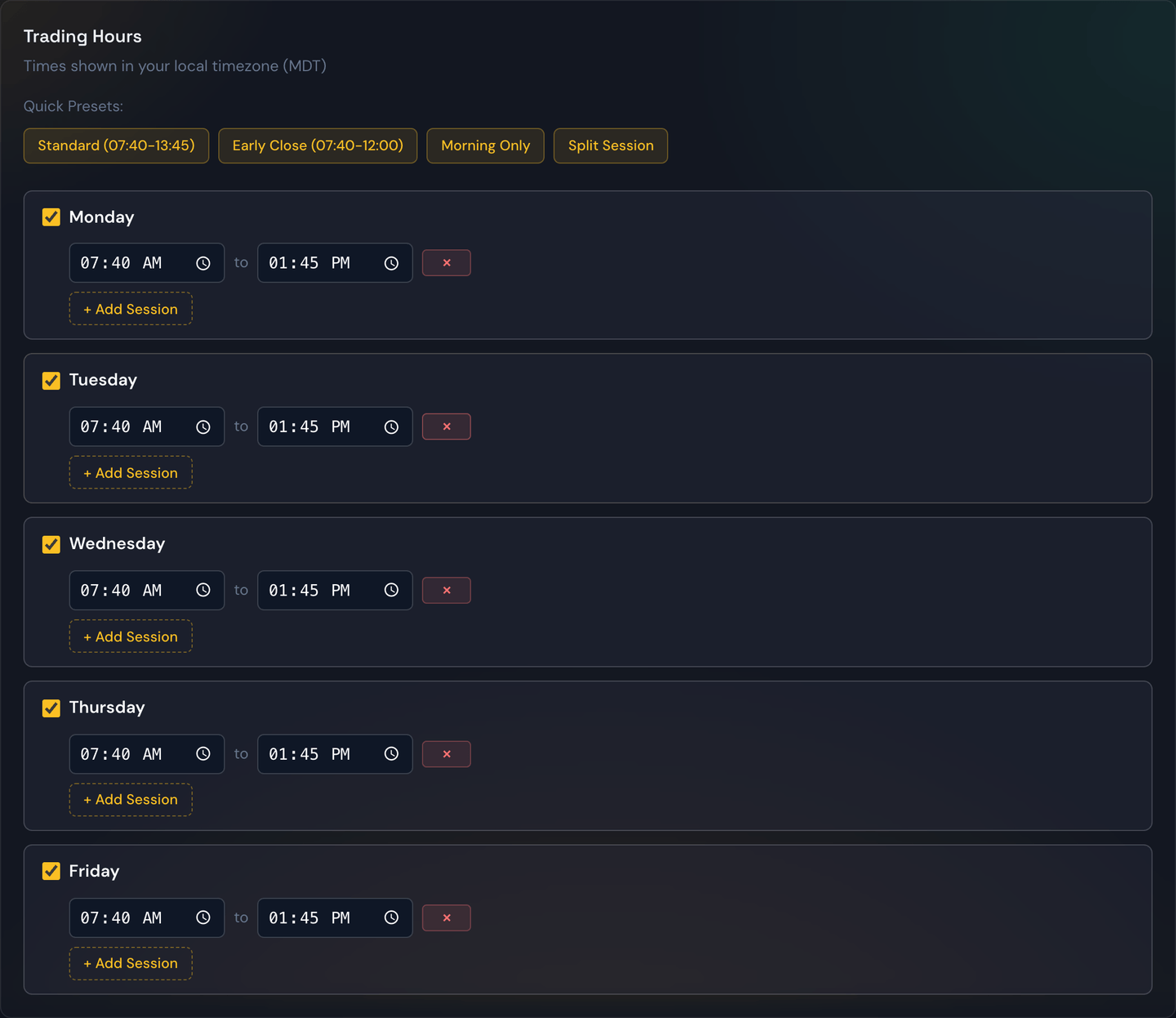
The trading-hours setting tells your bot during which part of the day it's allowed to open new trades. Outside this window, alerts are ignored.
Tip
To set a start or end time, click the box and type it in directly — for example, type
9,4,5for 9:45. You don't have to fiddle with the pop-up clock. If you'd rather point-and-click, the small clock icon on the right of the box still opens the picker. Times are shown in your own local time zone — except on a futures strategy, where they're shown in US Eastern (see below).
Why limit the window?
Different parts of the trading day behave very differently:
- The first 15 minutes after open are often wild and erratic.
- Mid-morning tends to set the day's trend.
- The final 30 minutes before close are dominated by position-squaring and can whip around quickly.
Many strategies do their best work in the calmer middle of the day. Setting a window like 9:45 a.m. to 3:30 p.m. sidesteps the opening and closing chaos.
What it does and doesn't do
- It does prevent the bot from opening new trades outside the window.
- It does not force-close trades that were opened inside the window. Those continue running until they hit their profit target, stop-loss, or time limit — even if the window ends while they're still open.
If you want trades to close at a specific time too, use a time limit on individual trades or simply rely on the trade's own exit logic.
Trades that run past today
Some trades use options that expire days out (swing or multi-day trades). When a trade like that stays open overnight, its protective stop-loss stays alive across sessions automatically — you're never left unprotected between the close and the next open, and there's nothing extra to switch on. Same-day (0DTE) trades are unaffected and still wrap up within the day as usual.
Worked example
Your trading hours are set to 9:45 a.m. – 3:30 p.m. (Eastern).
- An alert arrives at 9:32 a.m. — ignored, window not open yet.
- An alert arrives at 10:10 a.m. — the bot evaluates and may open the trade.
- The trade opens and runs.
- The clock hits 3:30 p.m. — new alerts are now ignored, but the open trade keeps running.
- The trade hits its profit target at 3:43 p.m. — closed.
Tip
Trading hours and skip days work together. Trading hours decide when in the day the bot can trade; skip days decide whether the day counts at all.
Futures: the seven-day grid and "Always On"
Stock and options markets are open a little over six hours a day. Index futures are not — they trade nearly around the clock: the week opens Sunday at 6:00 p.m. Eastern and runs straight through to Friday at 5:00 p.m. Eastern, pausing only for a one-hour break each weekday at 5:00 p.m. Eastern.
So when a strategy is set to Futures, its Trading Hours panel looks different:
- All seven days are listed, starting with Sunday. That's not a typo — Sunday evening is when the futures week actually begins, and a Monday-to-Friday grid has no way to express it.
- Times are shown in US Eastern, not your local time zone. Futures sessions run past midnight, so a local-time grid would put a Monday Eastern block on your Sunday and get confusing fast. Eastern is the exchange's own clock, and it's how every futures session time is quoted.
- There are no quick presets. The stock-market presets (Standard, Early Close, Morning Only, Split Session) are all built around a 9:30–4:00 day and don't mean anything for a market that runs 23 hours.

Always On (24/7)
At the top of the panel is a single switch: Always On (24/7). Turn it on and the day-by-day grid disappears — your strategy will consider signals at any hour, on any day. No time restriction at all.
This is the right setting for most futures strategies. You're not opting into anything risky by using it: outside the real session hours there are simply no prices, so nothing can trade regardless of the switch. It just stops the schedule from being the thing that blocks an overnight signal.
Turn it back off and your previous day-by-day schedule comes back exactly as you left it.
Building your own overnight window
If you want a narrower window than 24/7 — say you only want to trade the overnight session and not the U.S. day session — you build it out of ordinary blocks, remembering that a block can't cross midnight. Each calendar day gets its own row, and you can have up to two blocks per day.
For example, to trade only the Sunday-evening-through-Monday-afternoon stretch:
- Sunday: 18:00 – 23:59
- Monday: 00:00 – 16:59
Read together, that's one continuous window from Sunday 6:00 p.m. to Monday 5:00 p.m. Eastern. To repeat it every night of the week, add a second Monday block of 18:00 – 23:59 and do the same for Tuesday through Thursday.
Note
Leave Saturday switched off. The market is closed from Friday 5:00 p.m. Eastern until Sunday 6:00 p.m. Eastern, so a Saturday block would never do anything.
Your daily limits follow the futures session, not the calendar
On a futures strategy, your daily limits reset with the trading session, not at midnight.
That matters because a futures "day" isn't a calendar day. The session runs from 6:00 p.m. Eastern straight through to 5:00 p.m. the next afternoon — right past midnight. If your limits reset at midnight, a strategy set to 5 trades per day could take 5 in the evening and another 5 after midnight: 10 trades in what is really one session.
So instead, everything daily on a futures strategy resets during the 5:00 p.m. Eastern maintenance break, while the market is shut:
- Trades per day
- Max Loss Count (your losing-trade cap)
- Your per-strategy Killswitch — its running profit/loss total, any day-lock it hit, and any unlock you granted
Then they stay put for the full 23 hours of the session that opens at 6:00 p.m.
Worked example. Your futures strategy is set to 5 trades per day and 3 max losses.
- Monday 7:00 p.m. — the session is running. You take 2 trades.
- Tuesday 1:00 a.m. — 2 more. Your counter reads 4 of 5. It did not reset at midnight — this is still Monday evening's session.
- Tuesday 10:00 a.m. — you take your 5th. The strategy stops opening new trades for the rest of the session.
- Tuesday 5:00 p.m. — the maintenance break. Counters reset to 0.
- Tuesday 6:00 p.m. — the new session opens with a fresh 5 trades and a fresh loss cap.
Note
Options strategies are unchanged — theirs still reset at midnight Eastern, which is correct for a market that closes at 4:00 p.m. and reopens the next morning.
Skip Days are the one thing still on the calendar day. Marking a Wednesday as a skip day skips Wednesday 12:00 a.m. through 11:59 p.m. Eastern — which covers the tail of the session that opened Tuesday evening, and not the Wednesday-evening start of the next one. If you're skipping around an event, check which side of 6:00 p.m. it falls on.