
Your account has two independent safety systems that stop trading automatically when you hit a dollar amount you set. They run side by side and don't interfere with each other:
- The account killswitch — described on this page — watches your whole account, across every strategy.
- The Per-Strategy Killswitch watches one strategy at a time, on its own.
You can run either one, both, or neither.
The four targets
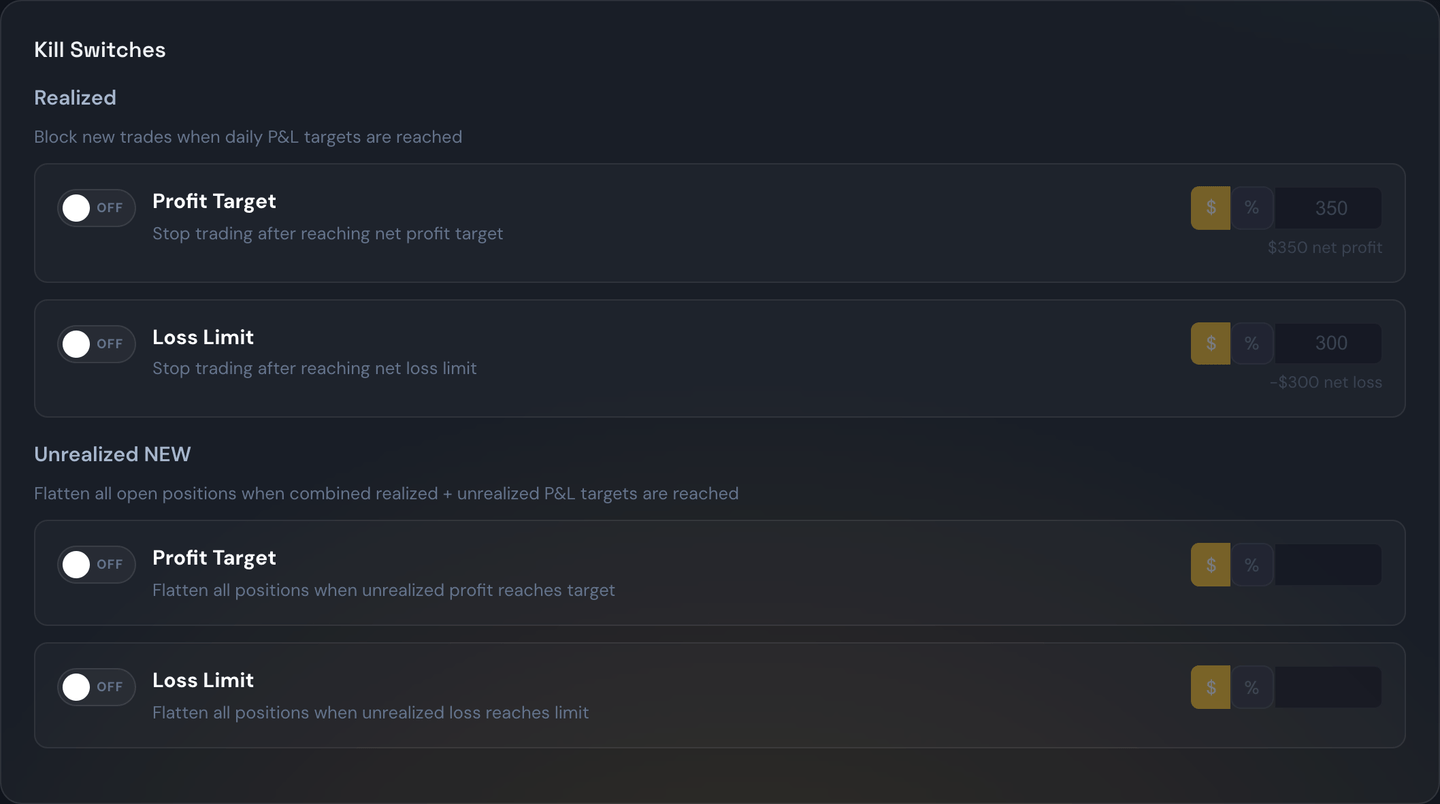
Open the Strategies page and look at the Account Settings card. You can set up to four targets, and each one works on its own:
| Target | What it means |
|---|---|
| Realized profit | "Stop me once I've banked $X in profit today." |
| Realized loss | "Stop me once I've banked $X in losses today." |
| Unrealized profit | "Stop me once I'm up $X today, counting positions that are still open." |
| Unrealized loss | "Stop me once I'm down $X today, counting positions that are still open." |
Each target can be a flat dollar amount ($500) or a percentage of your account balance (10%). Use the $ / % buttons next to the number to switch. Set a target to 0, or leave its toggle off, to disable that trigger.
"Realized" vs "Unrealized" — the difference
Realized means money that's already locked in. A trade has to be fully closed before it counts. It's checked the moment each trade finishes.
Unrealized means your live, up-to-the-second number. It's checked every second, and it counts both your closed trades and the current value of everything still open. So if you banked $300 in the morning and you're currently up another $200 on an open position, your unrealized number is $500 — not $200.
That combination is deliberate. It means once you've locked in a loss, it doesn't get "forgotten" the moment the next trade closes.
Note
The unrealized number only counts positions the bot opened. If you hold your own positions in the same brokerage account that you opened by hand, they never move the needle.
The unrealized check needs live prices. If quotes go stale (older than 30 seconds), or a multi-leg spread is missing a price on any one leg, that position is skipped for that second rather than guessed at.
What happens when it fires
- It cancels all of its own working orders — your stop-losses, profit targets, and brackets.
- It sends market orders to close every position it opened — unless you've turned "Flatten open positions on trigger" off, in which case open positions keep running on their own stops and only new entries stop. That toggle sits at the top of the Kill Switches section in Account Settings, and each strategy can override it on its own Killswitch tab.
- It locks the account for the rest of the trading day. No new trades from any strategy, from any source — alerts, webhooks, or manual entry through the portal.
- It shows you a red banner in the portal explaining exactly what fired, the target that was hit, your P&L at that moment, and the timestamp.
A realized target waits a couple of seconds before it locks anything, and re-checks that the target still holds — including anything still open. Two trades that close in the same second book in whatever order they finish, so acting on the first one alone can mean acting on half the day.

Every signal rejected after that gets logged and shown in the portal with a plain-English reason — so "the alert fired but I didn't get a trade" always has a visible answer.
What it will not do
- It will never touch positions you opened yourself. Closing is strictly limited to positions the bot can prove it owns. Anything it can't attribute to itself is skipped and logged. There is no "close everything in the account" mode, on purpose.
- It does not undo or reverse anything. It closes at market and stops. It doesn't hedge, reverse, or re-enter.
- It does not change your targets. Your settings stay exactly as you configured them, and they come back automatically tomorrow.
One behavior to be aware of
Once the killswitch locks — for any reason — all further automatic checking stops for the day. So if your profit target fires at 10 a.m. and your open positions later turn into a loss, the loss killswitch will not fire on top of it. The day is already locked; the system considers its job done.
The numbers on the Daily Guardrails card
The card shows two things, and it's worth knowing which is which:
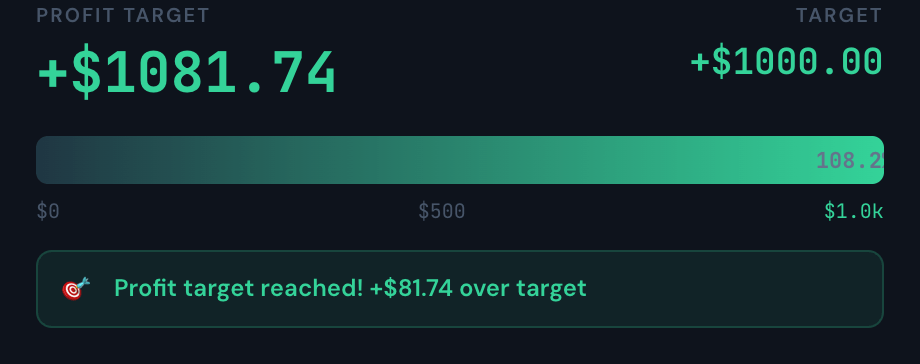
- The big number is your live total for today: closed trades plus open positions right now, before any broker fees. It updates every second as your open trades move — useful context for where you stand.
- The progress bar, the badges, and the "to target" distances run on your trading engine's own tally — the exact number the killswitch compares against your profit target and loss limit. When one target trips, the badge says confirmed by your trading engine. This tally counts closed trades (plus any same-day broker corrections — see below); open positions only count toward the separate Unrealized targets.
Why two numbers? Because they answer different questions. The live total asks "where am I right now, including open trades?" The engine tally asks "has my realized P&L actually crossed the line I set?" (The Net figure in the bar at the very top is a third thing: closed trades only, minus estimated broker fees.)
Example
Your closed trades today add up to +$2,158, you have one open trade sitting at -$10, and your estimated fees are -$154. The card's big number shows +$2,148 (closed +$2,158 and the open -$10, no fees); the guardrail bar measures +$2,158 against your target; and the top bar's Net shows +$2,004. All three are correct — they're measuring different things.
Note
If you trade futures, this card counts your day from midnight. The Completed Today list and the top bar's Net count futures from the 6:00 p.m. Eastern open the evening before. So in the morning, a futures trade you closed last night shows in the list and in Net, but not in this card's total. For example, if you closed an NQ trade for +$300 at 8:00 p.m. last night, it's part of today's Net, but this card doesn't count it. Your futures strategies' own daily limits follow the futures trading day. See Trading Hours.
Broker corrections count — and disagreements are flagged
Sometimes the broker's records correct a trade after the fact — a fill price adjusts, or a trade that closed at the broker gets backfilled into your history. Those corrections update your killswitch tally the same day, so the guardrail trips when your real P&L crosses your target, not just the originally-reported one.
If the portal's own daily total and the engine's killswitch total ever disagree by more than a dollar, a warning chip appears on the card showing both numbers. The engine's number is always the one that decides — the chip just makes sure you're never reading one number while the killswitch acts on another.
Picking your numbers
A useful rule of thumb: choose loss and profit numbers you'd genuinely be okay walking away from. The killswitch only works if you set it before the heat of the moment.
Example
You set a realized loss target of -$300. After three losing trades you're at -$310. The bot closes what it has open, stops for the day, and you go do something else. (This is the single most powerful tool for stopping a bad day from spiralling into a worse one.)
Tip
Pair a realized target with an unrealized one. Realized alone can be blown past by a single large open position that hasn't closed yet; the unrealized target catches that while it's still happening.
Unlocking for the rest of the day
When a killswitch trips you'll see the red "Killswitch locked for the day" banner at the top of the Trades page, and new signals are rejected. If you've thought it over and want to keep trading today anyway, press Unlock Killswitch on that banner and confirm.
Unlocking:
- Clears the lock and lets trading resume immediately.
- Unlocks the side that fired — profit or loss. If your profit target locked the day, your loss limit stays armed and can still stop you.
- Suppresses that target for the rest of today only, so the system doesn't instantly re-lock you one second later (your P&L is, after all, still past the target).
- Leaves your configured target completely untouched — it comes back at the next daily reset.
While you're unlocked, a small "unlocked for today" note replaces the red banner.

Example
Your profit target is +$500. You hit +$540 at 10 a.m. and the banner appears. You decide the setup in front of you is worth it, so you press Unlock Killswitch. New trades flow again for the rest of the day, your loss limit is still watching, and tomorrow morning your +$500 profit target is active again automatically.
Note
Unlocking is the right tool when you want to keep your killswitch for future days but override it just for today. If you never want this limit again, turn it off on the Strategies page under Account Settings.
Stopping it yourself, any time
You don't have to wait for a target. Stop Trading in the top banner stops every strategy for the rest of today, with the same choice about closing open positions, and trading comes back by itself tomorrow. It's the same day-lock this page describes — just started by you instead of by a number.
Resuming a stop you made yourself is gentler than unlocking a target: your profit target and loss limit stay armed. Full details are in Stop Trading for Today.
Paper trading
Paper Trading has its own completely separate killswitch that behaves identically — same targets, a real close-out of paper positions, and a real lock. A paper killswitch can never touch your real money, and a real one can never touch paper. Switching between them is seamless; nothing carries over.
If the system restarts mid-day
Everything survives a restart. Your daily P&L, any lock that fired, and any unlock you performed are all saved and restored — and they're date-stamped, so yesterday's lock can never carry into today.
Warning
A killswitch is a daily guardrail — it fires on a number you set in advance. If you need to close everything right now, that's Flatten All. If you've simply decided you're finished for the day, that's Stop Trading.