
When an alert comes in, something has to decide how many contracts to buy. That decision is made by the Risk Sizing box at the top of a strategy's Risk & Orders tab. Five controls live there, and they work as a chain — each one can only make the trade smaller, never bigger.
This topic explains each control, and — more importantly — how they interact, because that's where most confusion comes from.
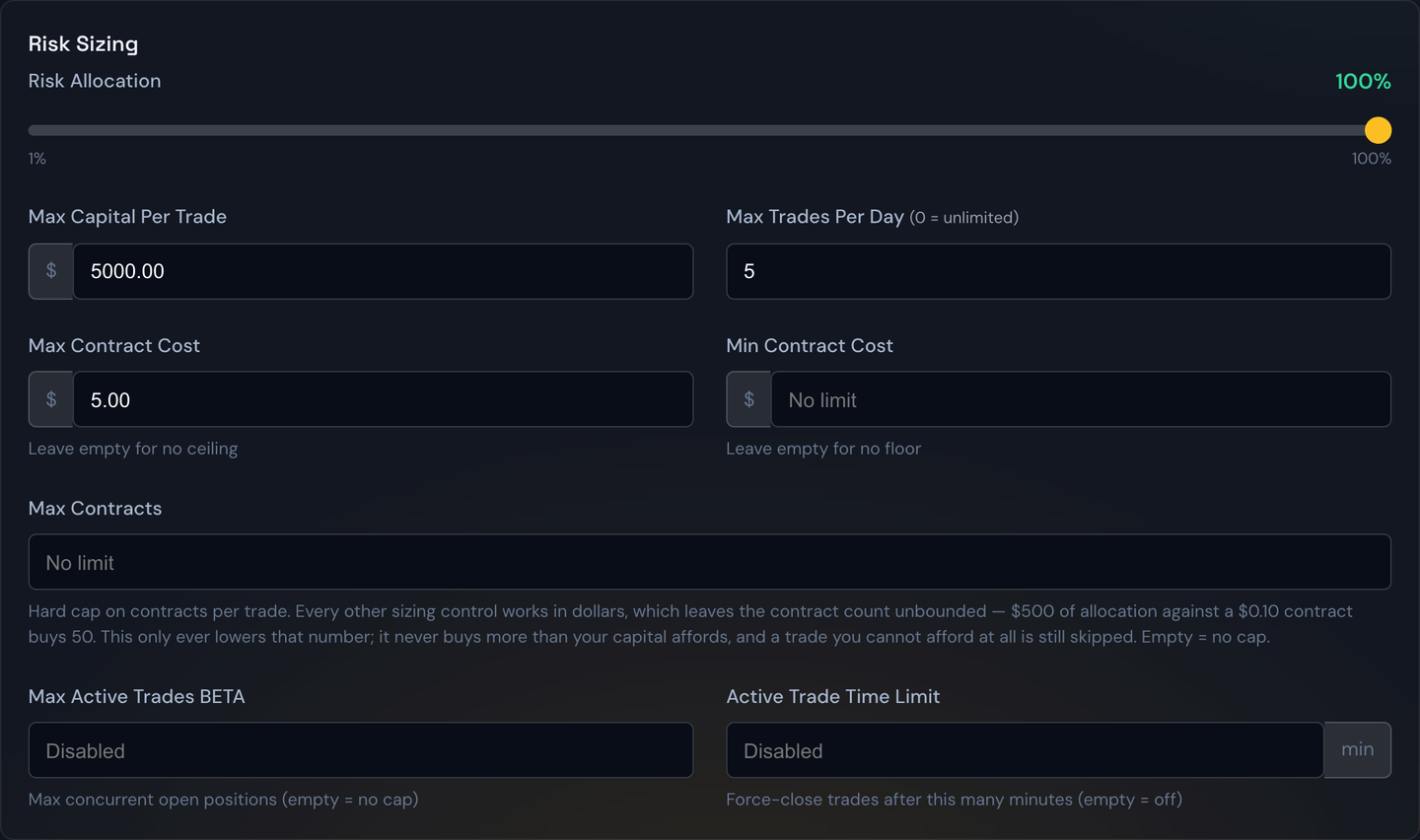
The chain, in order
- Your budget. The strategy's Allocation Amount (a dollar figure or a percentage of the account) is the pool it may spend from. See Capital Allocation.
- Risk Allocation % takes a slice of that pool for any one trade.
- Max Capital Per Trade is a hard dollar ceiling on that slice.
- Your plan's own per-trade ceiling is applied on top, whichever is lower. See Plan Limits.
- Whatever dollar figure survives all of that is divided by the contract's price to get a contract count.
- Max Contracts trims that count if it came out higher than you're willing to hold.
Example
Your strategy is allocated $10,000. Risk Allocation is 20%, so any one trade may spend $2,000. Max Capital Per Trade is $1,500, which is lower, so $1,500 is the real budget. An alert arrives for a contract priced at $1.20 — that's $120 per contract — so the bot buys 12 contracts for $1,440. If you'd also set Max Contracts to 10, it would buy 10 instead, for $1,200.
Risk Allocation %
The percentage of the strategy's budget that a single trade may use. At 100% (the starting value), one trade can use the whole allocation. At 20%, you're deliberately splitting the allocation across roughly five concurrent trades.
Tip
If you want several trades running side by side, lower this rather than lowering your allocation. Dropping the allocation shrinks the strategy overall; dropping Risk Allocation keeps the same total firepower but spreads it out.
Max Capital Per Trade
A flat dollar ceiling on any single entry, regardless of what the percentages worked out to. This is the number most people actually think in — "never put more than $500 into one trade."
Your subscription also enforces its own per-trade ceiling, and the lower of the two always wins. If you type a number above what your plan allows, the portal tells you so and the bot sizes against the plan's figure anyway. See Plan Limits.
Max Contracts
A hard cap on the number of contracts in one trade. Leave it empty for no cap.
Every other control on this list works in dollars, which leaves the contract count completely unbounded. That's fine at normal prices, but it stops being fine on cheap contracts: a $500 budget against a $0.10 contract ($10 apiece) sizes 50 contracts. The dollar ceiling held perfectly — you only spent $500 — but 50 contracts on a thin strike is a position that's hard to get out of at a fair price. Max Contracts is the control that says "I don't care what the math allows, never more than this many."
Example
Your budget for a trade is $800. An alert arrives on a contract priced at $0.15 ($15 apiece), which would size 53 contracts. With Max Contracts set to 20, the bot buys 20 contracts for $300 and leaves the rest of the budget unused.
Two things it never does:
- It never buys more. If your capital only affords 3 contracts and Max Contracts is 20, you get 3. It only ever lowers the number.
- It never rescues a trade you can't afford. If your budget can't cover even one contract, the trade is skipped, cap or no cap.
Note
Lottery strategies have their own separate Max Contracts box inside the Lottery section on the Identity & Capital tab. If both are set, the tighter of the two wins. See Lottery Trades.
Min / Max Contract Cost
These two are the odd ones out: they don't size anything. They're a yes-or-no gate on the contract's price, checked before the trade is taken at all.
- Max Contract Cost — refuse any contract priced above this. Leave empty for no ceiling.
- Min Contract Cost — refuse any contract priced below this. Leave empty for no floor.
Both are quoted per contract, per share — the price you see on the option chain, not the total. A $2.50 max means the bot skips a contract quoted at $2.51 (which would cost $251 to buy).
Example
You set Max Contract Cost to $2.50 and Min Contract Cost to $0.20. An alert arrives for a $3.10 contract — skipped, too expensive. Another arrives for a $0.08 contract — skipped, too cheap and too close to worthless. A $1.40 contract goes through and is then sized by the chain above.
Tip
Use Max Contract Cost to keep a strategy in the cheaper end of the chain so a single trade can still afford a meaningful number of contracts. Use Min Contract Cost to stay out of near-worthless long shots where the bid/ask spread eats the whole trade. A skipped contract isn't a failure — it shows up in your logs as a skip, and the strategy simply waits for the next alert.
When nothing fits
If the budget can't afford a single contract, the trade is skipped and you'll see a message saying the per-trade ceiling couldn't cover one contract. The fix is to raise Risk Allocation %, raise Max Capital Per Trade, or lower Max Contract Cost so the strategy only looks at contracts it can actually afford.
Futures strategies
Futures don't use this chain at all. A futures strategy sets Contracts Per Trade directly — you say "2 contracts" and it trades 2 — so the Risk Allocation slider, Max Capital Per Trade, and the contract-cost gates aren't shown on a futures strategy.
Tip
All of these numbers travel in a share code and can be replayed on the Backtest page, so you can test a sizing change against real past alerts before running it live.