
The Account Sizing page answers the question almost every new member asks first: what do I actually put in the two settings that matter — max capital per trade, and the daily profit killswitch — for an account my size?
It is not a guess or a rule of thumb. The page replays every trade the STAX account has taken on the DailyTrend signal source — the one the CS+ preset trades, and what the welcome tour sets up for you — at a smaller account, and shows what each size would have lived through. It refreshes every night after the close, so the numbers follow the real book rather than a snapshot from months ago.
You'll find it under Education in the left menu. Two places link straight to it, both opening in a new tab so you don't lose what you were doing: the welcome tour's max capital per trade step, and the DailyTrend listing on the Marketplace.
Start here
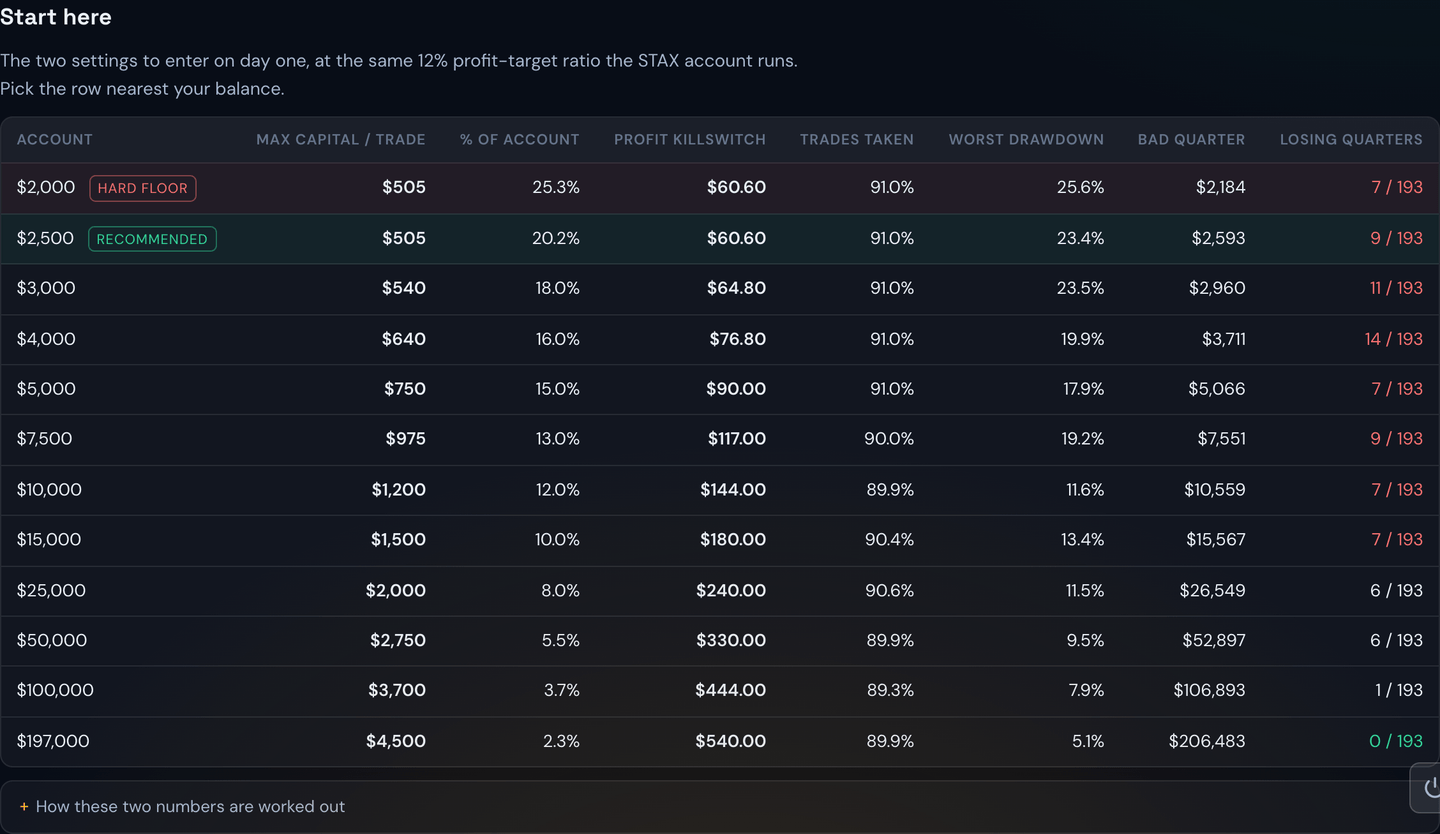
The first table is the one to use. Find the row nearest your balance and enter those two numbers into your Trading Settings.
Example
With $5,000 in the account, the page points you at a $750 max capital per trade and a $90 profit killswitch. With $2,500 it points you at $505 and $61.
Alongside each row you also get the uncomfortable half of the picture: the worst drawdown that size went through, the kind of quarter a member starting at a bad moment would have had, and how many of the tested quarters finished down.
Why a small account has to risk a bigger share of itself
This is the part that surprises people, and it is just arithmetic.
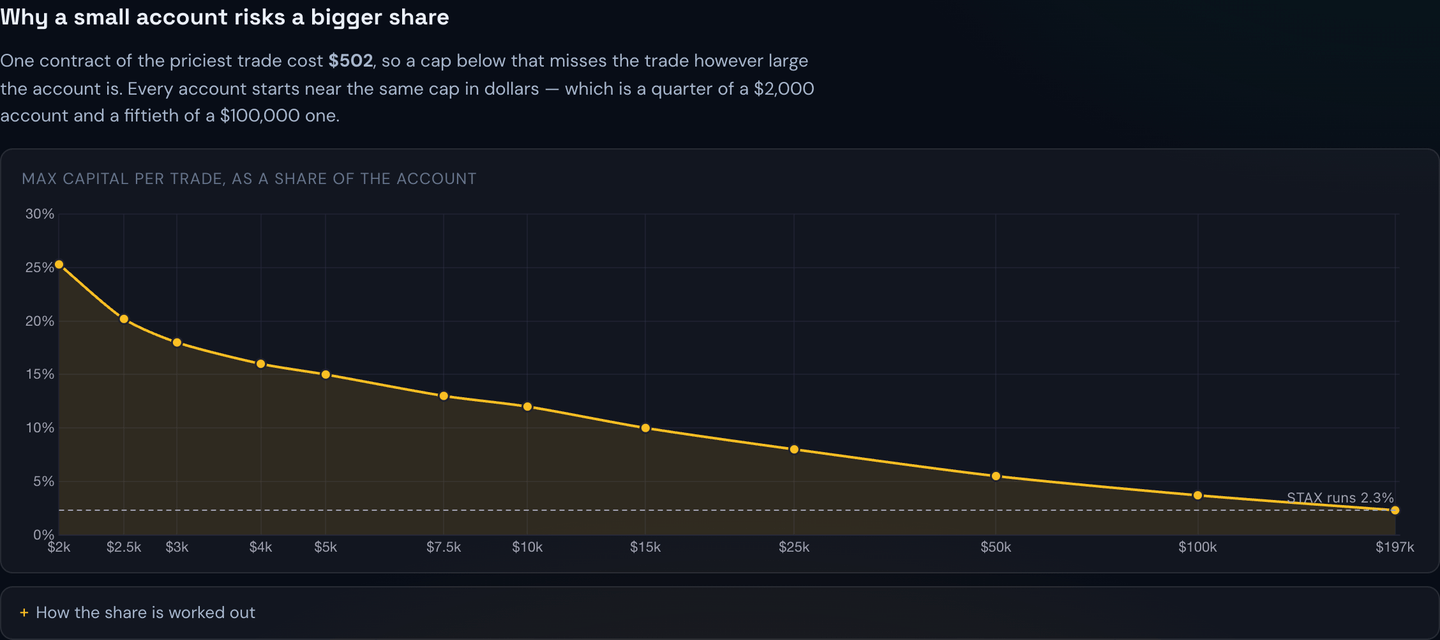
The bot buys whole contracts. The most expensive contract the strategy has ever bought cost about $500, so if your max capital per trade is set below that, the bot simply cannot take that trade — it never has enough to buy even one. That floor is a fixed dollar amount, and it does not care how big your account is.
So every account starts at roughly the same cap in dollars. On a $2,000 account that is a quarter of everything you have riding on one position. On a $100,000 account the same cap is a fiftieth. Your risk as a share of the account then falls on its own as the balance grows, without you changing anything about how the strategy trades.
Note
This is why you cannot simply copy the percentage the STAX account runs. It risks about 2.5% of itself per trade. Two and a half percent of a $2,000 account is $50 — not enough to buy a single contract, so you would sit out nearly every alert.
Fees hit a small order hardest
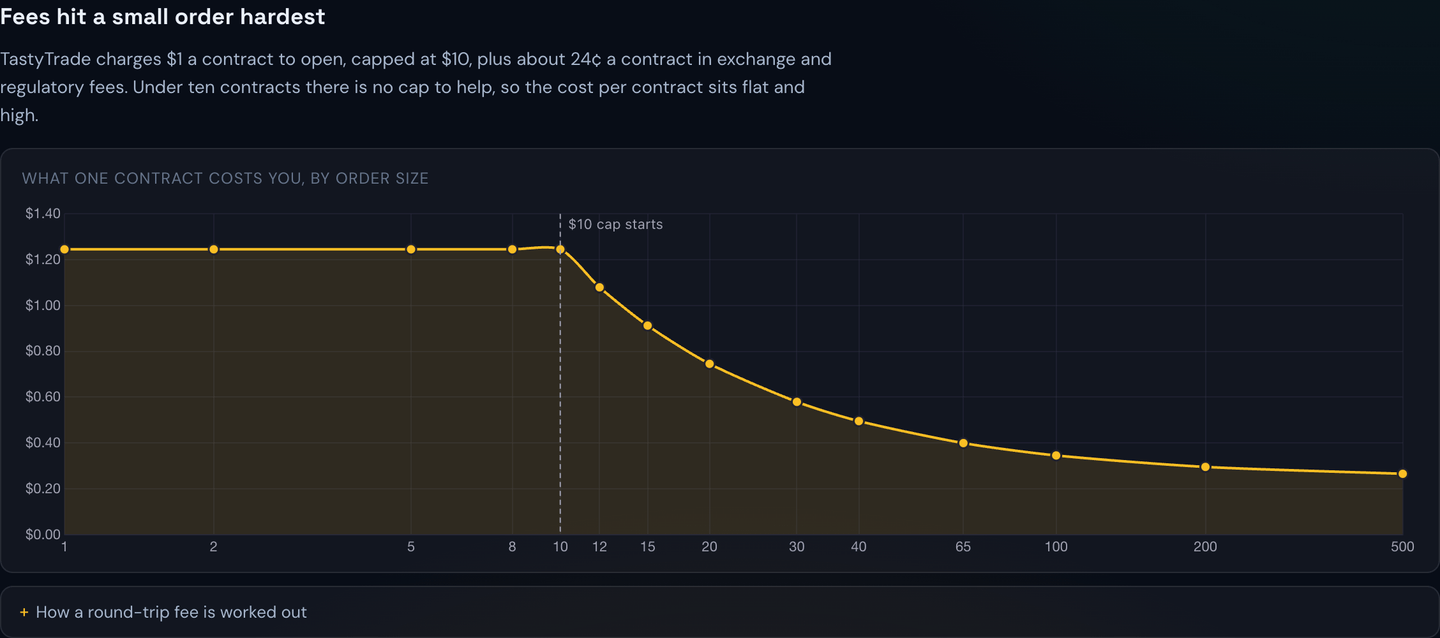
TastyTrade charges $1 per contract to open a position, but caps that at $10. Under ten contracts there is no cap to help you, so you pay the full $1 every time.
| You buy | You pay per contract |
|---|---|
| 1–10 contracts | about $1.26 |
| 34 contracts | about $0.54 |
| 100 contracts | about $0.34 |
A small account trading five contracts pays roughly four times the per-contract cost of a larger account on exactly the same trade at exactly the same prices. It is a real drag, not a rounding error, and it is a large part of why very small accounts struggle with an options strategy.
When to scale up
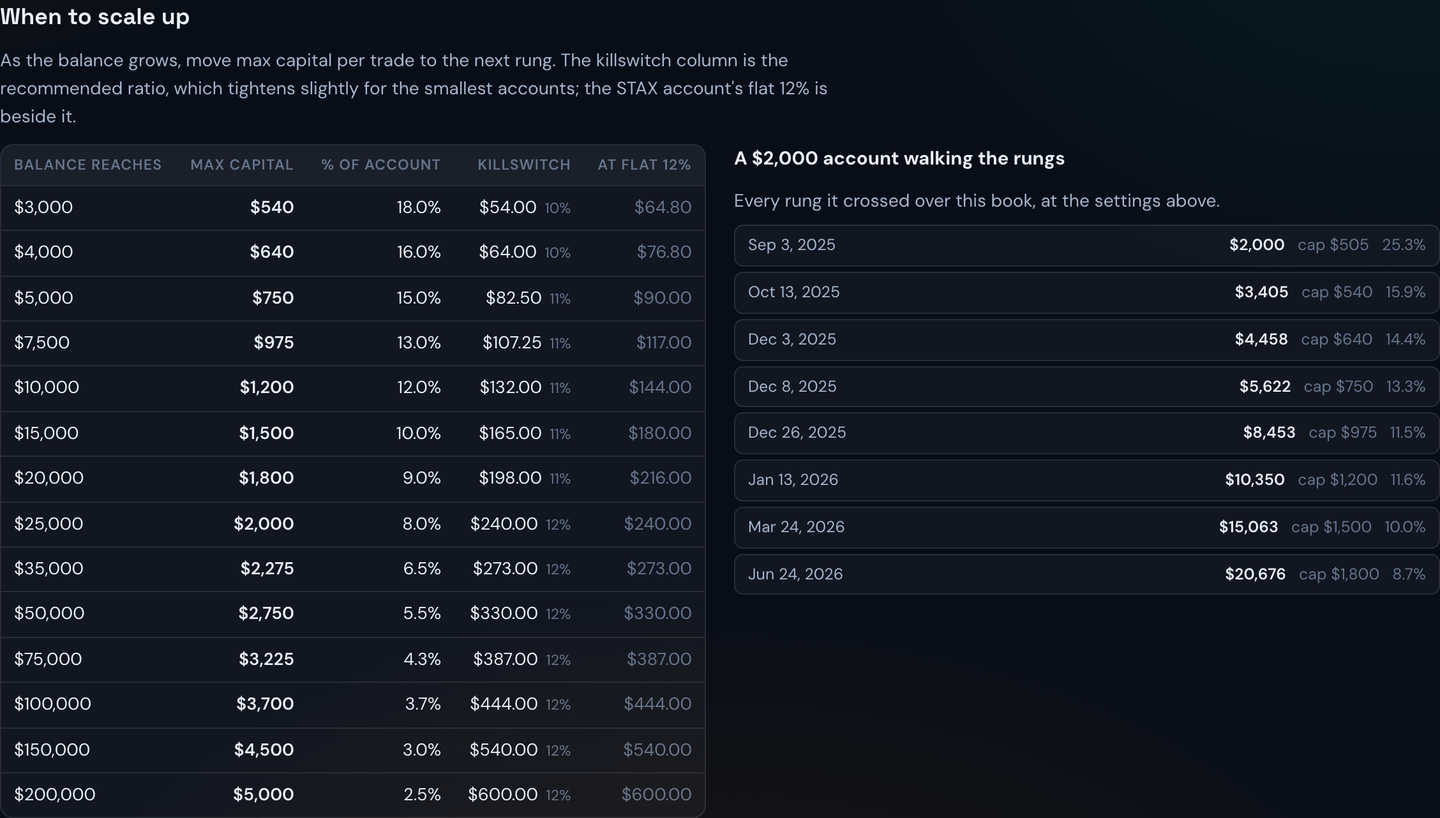
The When to scale up table is a ladder. Each rung says: once your balance reaches this much, move your max capital per trade to this number.
Example
You start at $2,500 with a $505 cap. When the balance passes $3,000 you move the cap to $540; at $5,000 you move it to $750; at $10,000 to $1,200. You are not recalculating anything — you are stepping up a rung.
Beside the ladder you can see a $2,000 account walking those rungs across the real book, with the date it crossed each one. It is the clearest picture on the page of what growing into the strategy actually looks like.
Choosing the profit killswitch
The killswitch is your daily profit target. Once the day's realised profit reaches it, the bot stops taking new trades and you are done for the day.
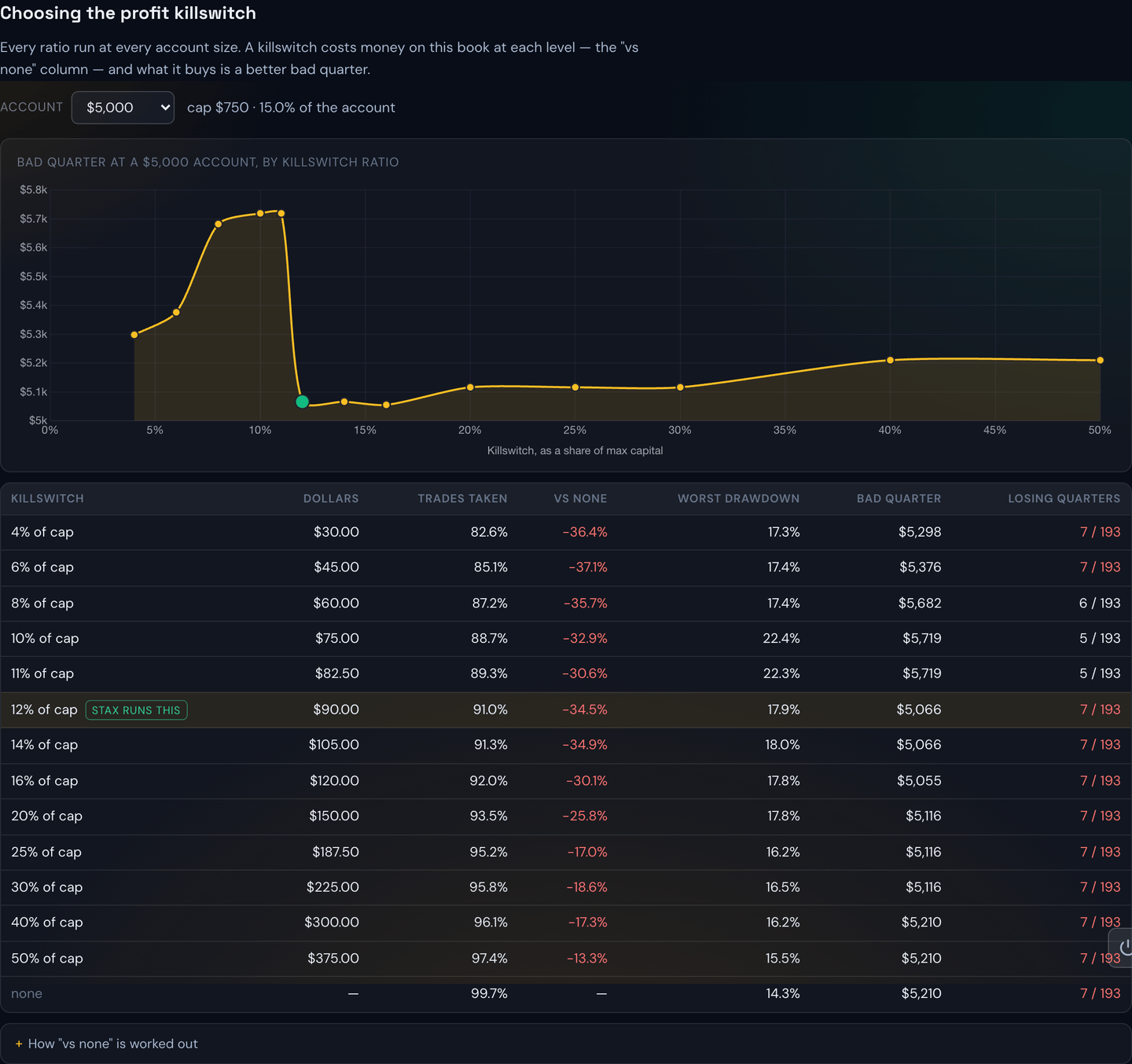
Pick your account size from the dropdown and you get every ratio tested at that size. Two things are worth understanding before you reach for a tighter number:
- A killswitch costs money over this book at every level. The "vs none" column shows how much. Stopping while you are ahead means you also stop before some of the day's remaining winners.
- What it buys you is a better bad quarter. The tightest settings cut the number of losing quarters roughly in half.
That trade — a little less upside for a lot less downside — is why the STAX account runs one at 12% of its cap, and why the page recommends the same ratio to you rather than the setting that merely made the most money looking backwards.
Tip
The quarter columns are the ones to trust. A single long-run balance is a fragile number; the page builds nearly 200 overlapping quarters precisely so you can see the range of outcomes instead of one lucky path.
A tighter target for smaller accounts
Below $25,000 the page recommends a slightly tighter ratio than the 12% the STAX account runs — 10% under $5,000, 11% up to $25,000.
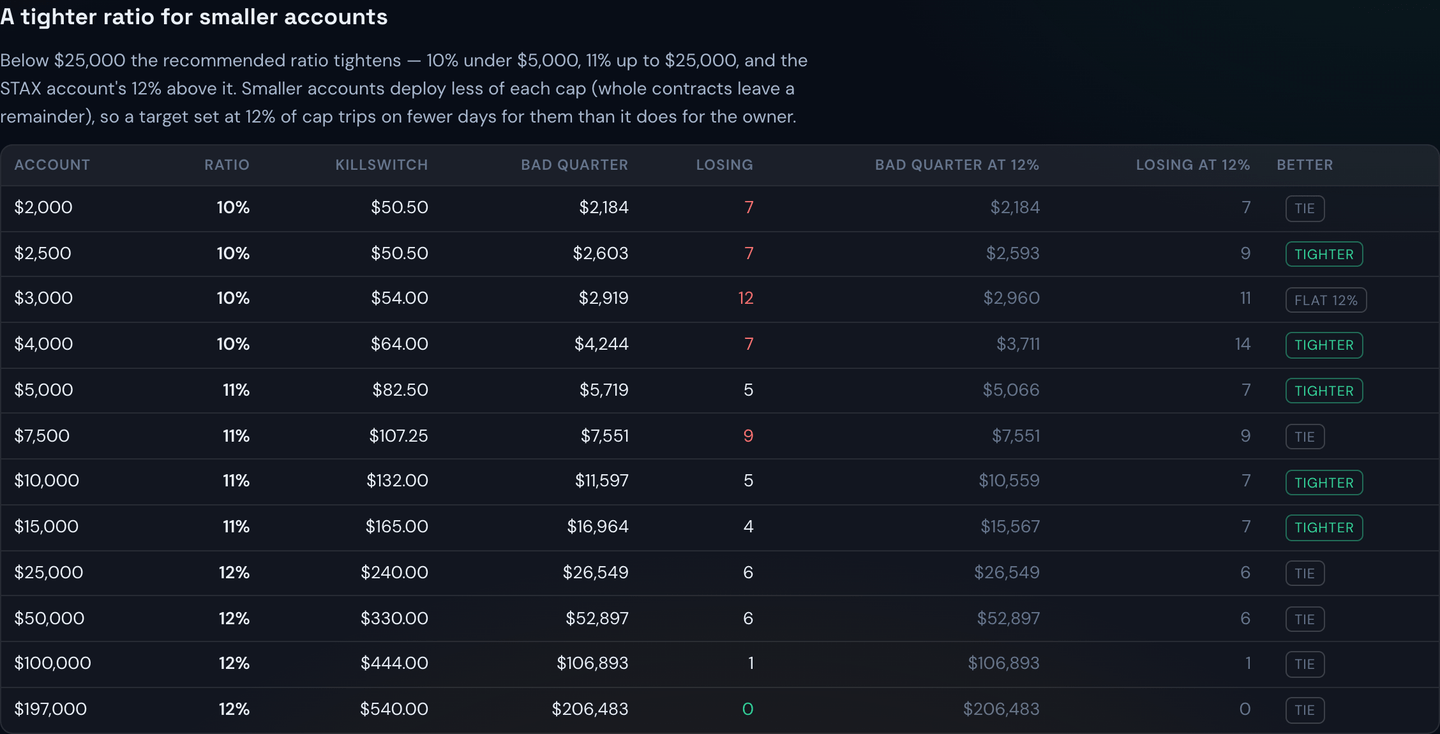
The reason is the remainder again. A smaller account leaves more of each cap unspent, so a target set at 12% of that cap is reached on fewer days than it is for a large account. Tightening it slightly puts you back in step.
Example
At $5,000 the tighter 11% target is $82.50 instead of $90. A small change, and across the tested quarters it was the difference between one losing quarter and seven.
Capping trades per day instead
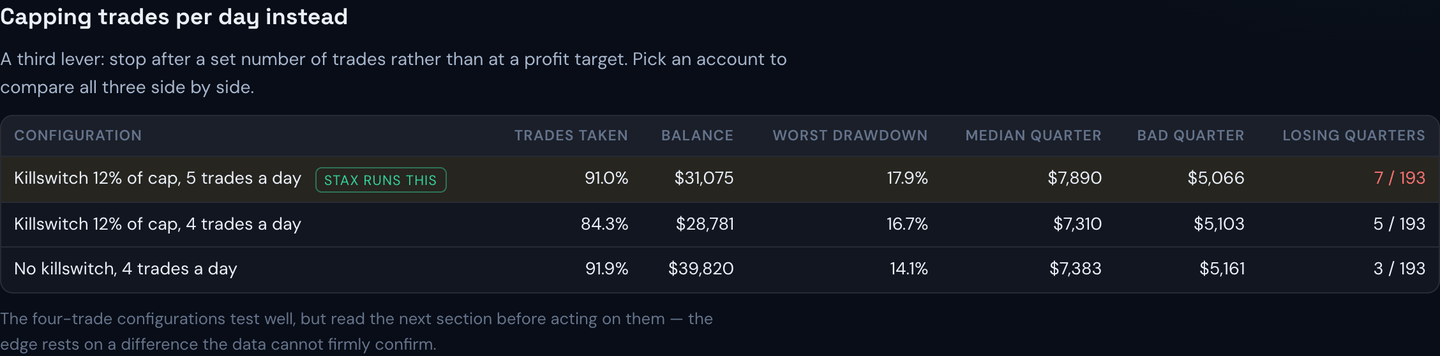
There is a third lever: stop after a set number of trades rather than at a profit target. The page compares all three side by side for whichever account size you pick.
Note
The four-trade-a-day setups test well, but read the next section before you act on them. Their advantage rests on a difference the data cannot firmly confirm.
Does the order of the day matter?
This chart asks whether the first trade of the day is better than the fourth.
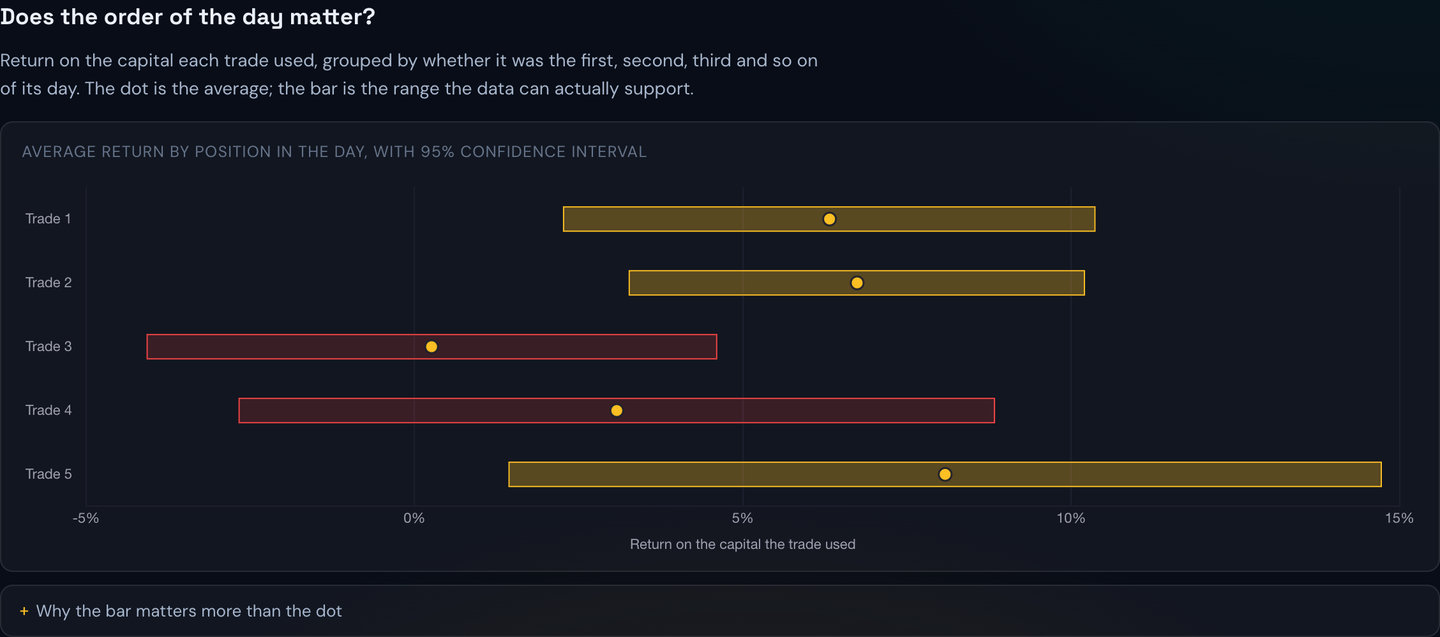
The dot is the average return for that slot. The bar is the range the true average could plausibly sit in, given how many trades landed in that slot and how much they varied.
A bar that crosses the zero line means the edge is not established. There may be one; this record cannot tell you. Two of the five slots cross it, which is exactly why the recommended settings do not rely on skipping particular trades.
Tip
Wider bar, less certainty. The slots with fewer trades have the widest bars, which is the data being honest about how little it knows.
What a bad run looks like
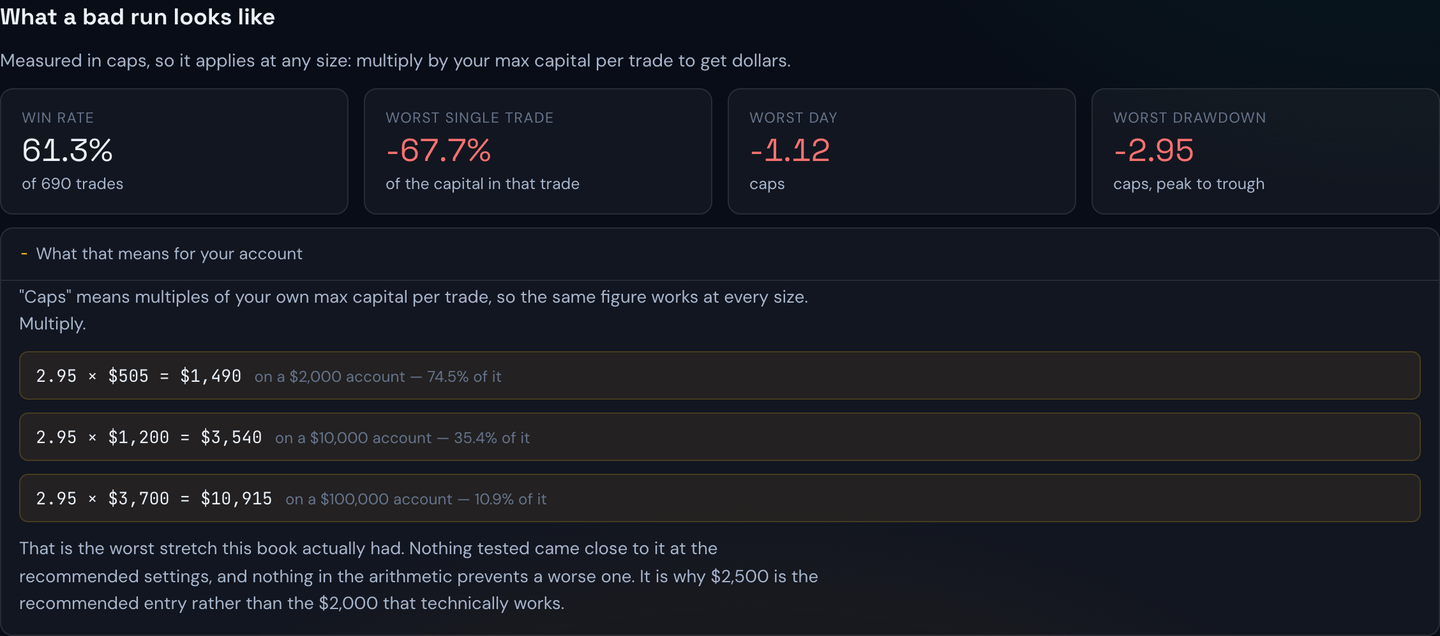
The risk tiles are measured in caps rather than dollars, so they work at any size: multiply by your own max capital per trade.
Example
The worst peak-to-trough stretch in the book was about 2.95 caps. If your cap is $505, that is roughly $1,490 — which on a $2,000 account is most of it. Nothing tested came close to that, but nothing prevents it either.
That single figure is the reason the page recommends $2,500 as a starting point rather than the $2,000 that technically works. At $2,000 every setting is pinned to the floor and there is no room left for a worse run than history.
Warning
Everything on this page describes what has already happened, over one profitable stretch of about thirteen months. It is a description, not a forecast, and not advice. A smaller account takes more risk per trade by necessity — go in understanding that, and start lower than you think you should.
Where the numbers come from
Entries and exits are held exactly as they happened. The only thing that changes for a smaller account is how many contracts it could have bought, and therefore the dollars. Nothing is simulated or modelled from prices.
The page also tells you when it was generated and the date range it covers, and it lists its own known limits in the final section — including any trades left out and why. If the nightly refresh has not run yet, it says so rather than showing you stale figures.
See also Trading Settings for where these two values are entered, and I Want to Start Safer if you would rather begin with less exposure than the table suggests.