
TastyTrade is the broker we recommend for options, and the one most bots run on. It trades single-leg options and spreads, and the broker holds your bracket itself — so your stop and your target rest at the exchange rather than being watched by your bot.
Connecting it is a one-time job you do yourself, in two places: you create an OAuth client at tastytrade, then paste the three values it gives you into your bot's own settings. Nothing is typed into this portal, and nobody at Stax needs your tastytrade password.
You don't have to do this to get started. Your bot runs on Paper out of the box — same strategies, same risk settings, simulated money — so you can watch a full day's trading before you connect a real account. See Paper Trading.
Before you start
- A tastytrade account. If you don't have one, open an account. That's a referral link — we both get a bonus, and you're welcome to sign up without it.
- API access opted in. Go to Manage → My Profile → API and opt in. This is the step people miss and then write to support about: without it there's no OAuth Applications tab to find in step 1.
- A desktop browser. The OAuth screens aren't in the tastytrade mobile app.
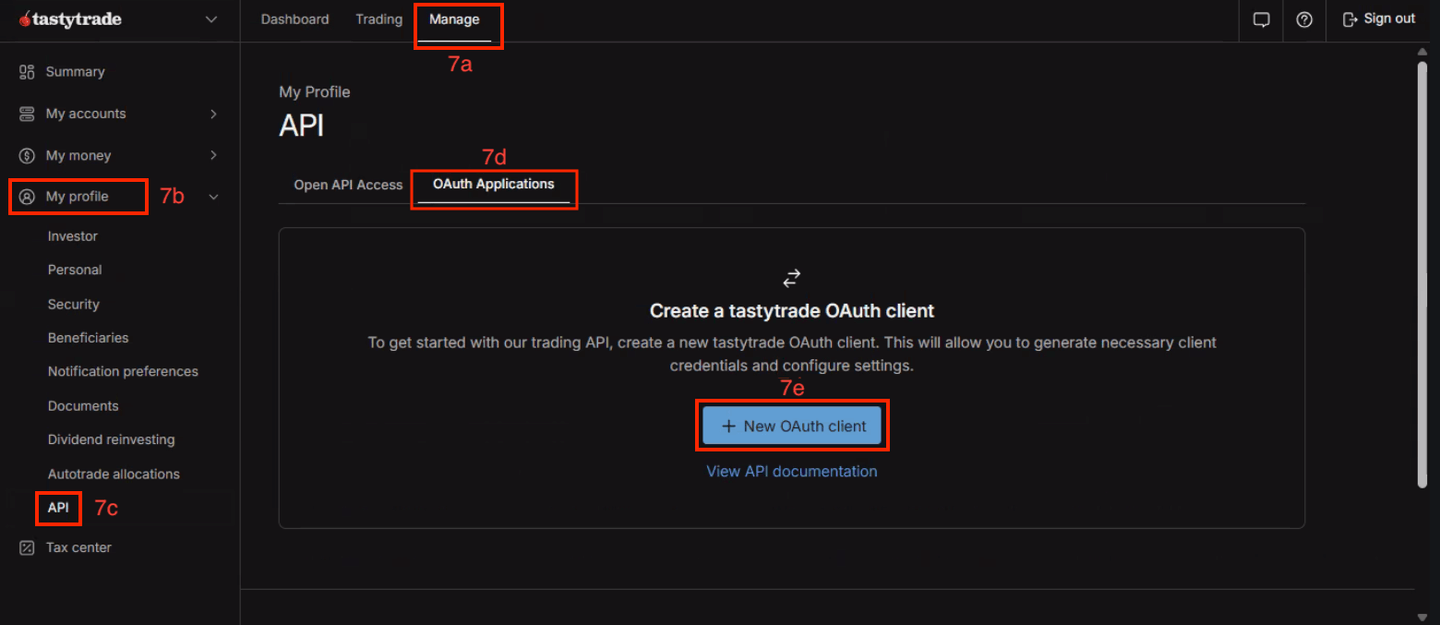
About the screenshots: the red numbers baked into them (9, 12a, 14 and so on) are from the older setup walkthrough these came from, and don't line up with the steps below. Follow the red boxes, not the numbers — the boxes point at the right buttons.
Step 1 — Create an OAuth client
- Press Manage at the top.
- Press My Profile in the left navigation.
- Press API in the left navigation, inside My Profile.
- Press the OAuth Applications tab.
- Press + New OAuth Client.
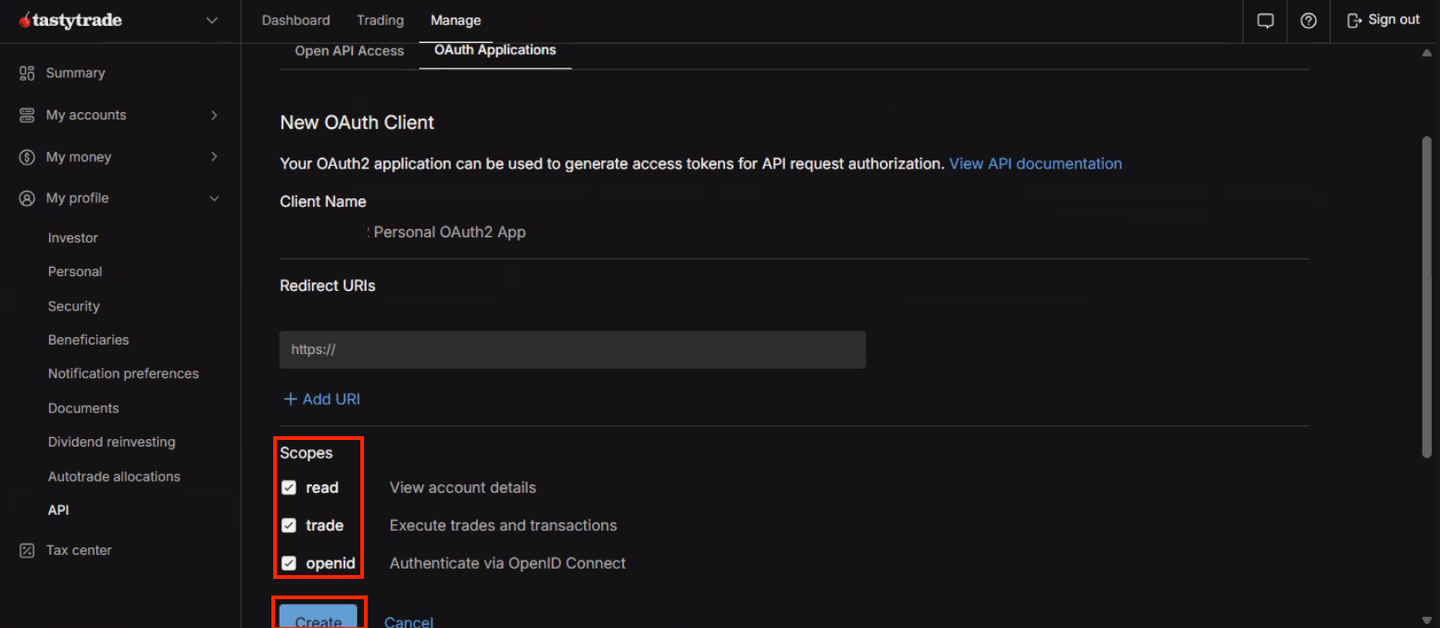
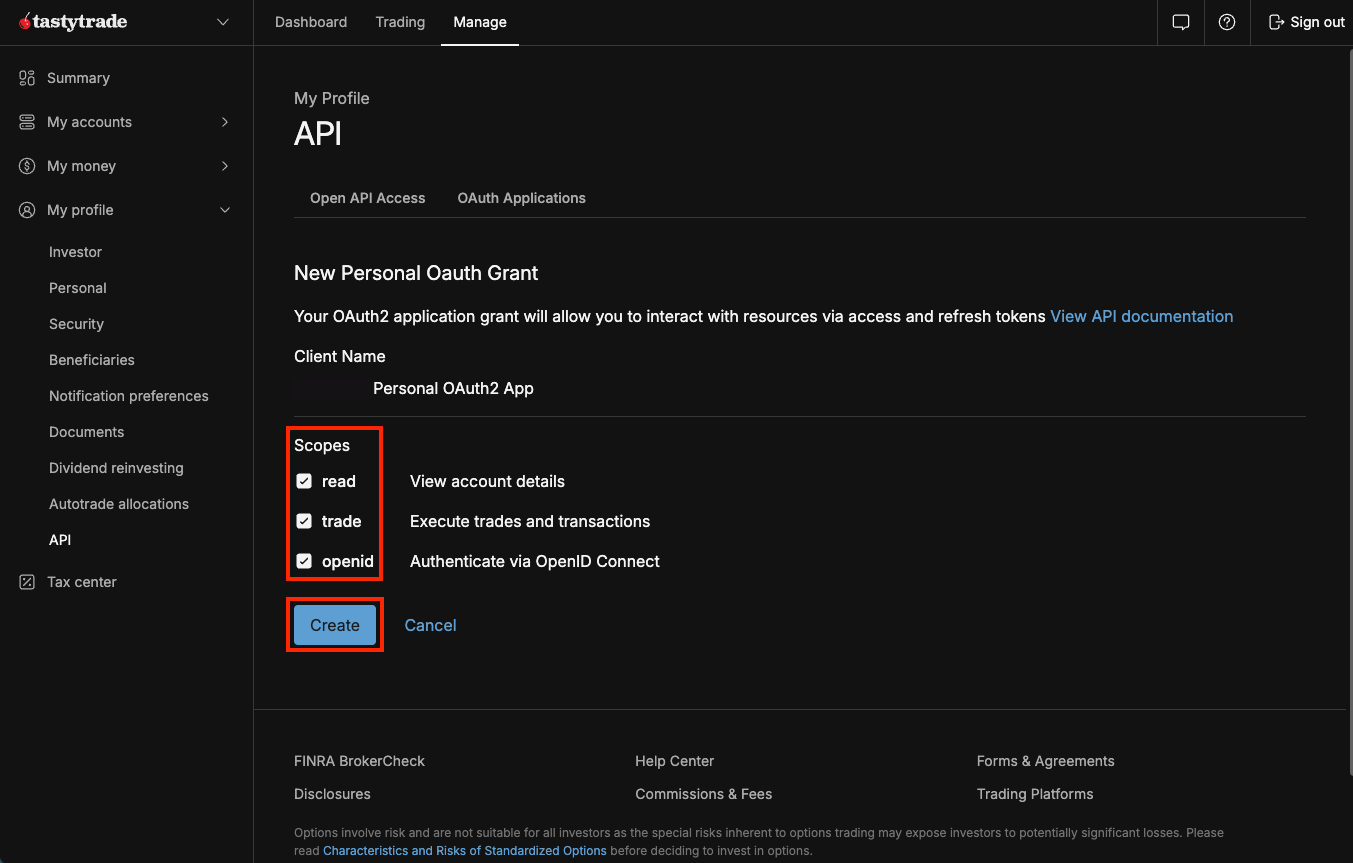
Select all scopes and press Create. Your bot both reads your account and places orders in it, so a partial selection leaves it half-working in a way that only shows up mid-trade.
Step 2 — Copy the client id and secret
tastytrade now shows you a Client ID and a Client Secret.
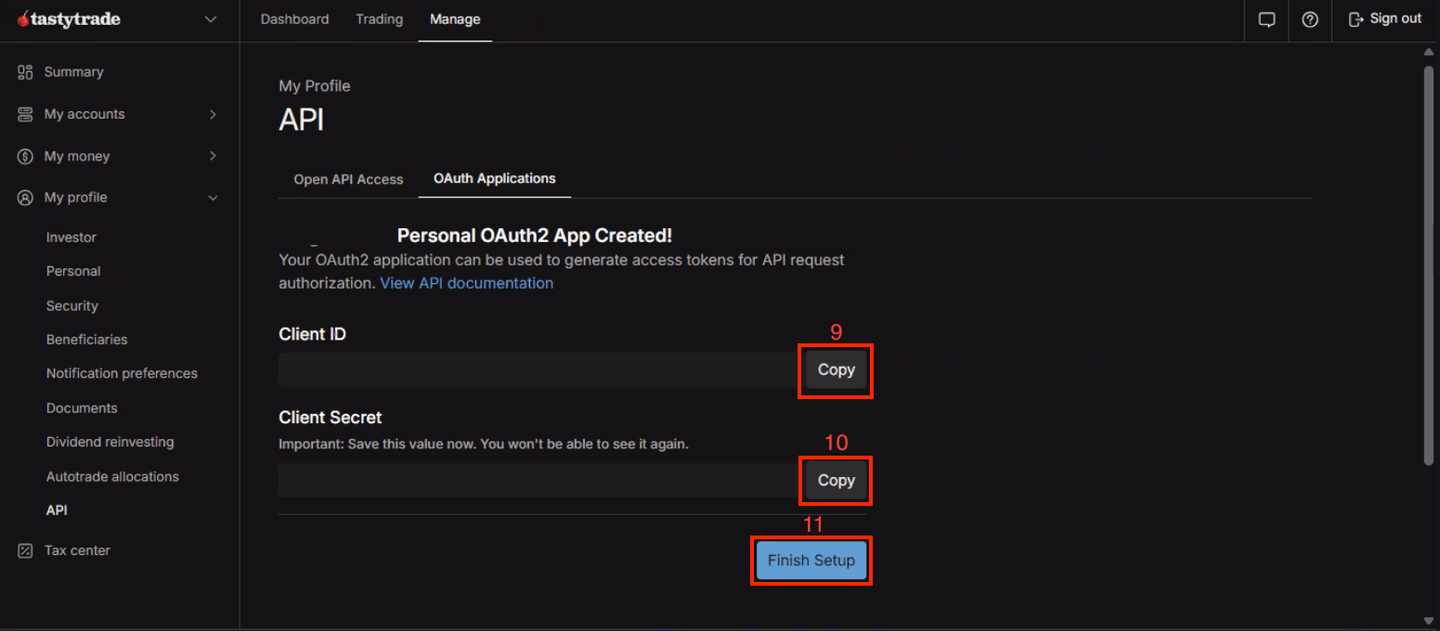
Copy both into your bot's own app settings, under Settings → Config Vars, then press Finish Setup back at tastytrade. Your bot's settings page lists the exact field for each one.
Copy the secret now. tastytrade shows it once. If you lose it, you can't look it up — you create a new client and start this step again.
Step 3 — Create a grant and copy the refresh token
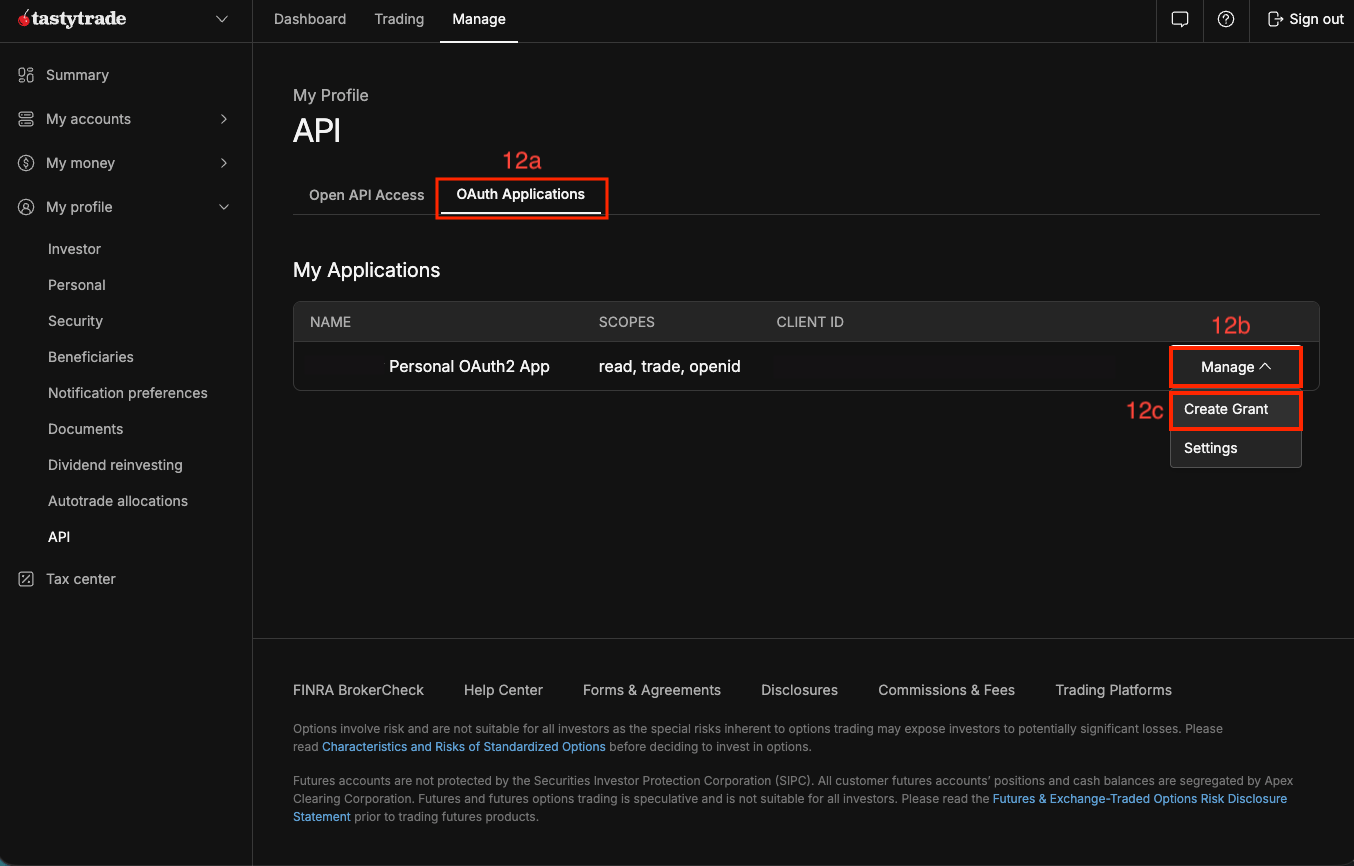
The client from step 1 identifies your bot. A grant is what actually gives it access to your account, and it's a separate step.
Back in tastytrade, on the OAuth Applications tab: press Manage, then Create Grant.
Select all scopes again and press Create.
Copy the Refresh Token it gives you into your bot's settings alongside the other two, then press Finish.
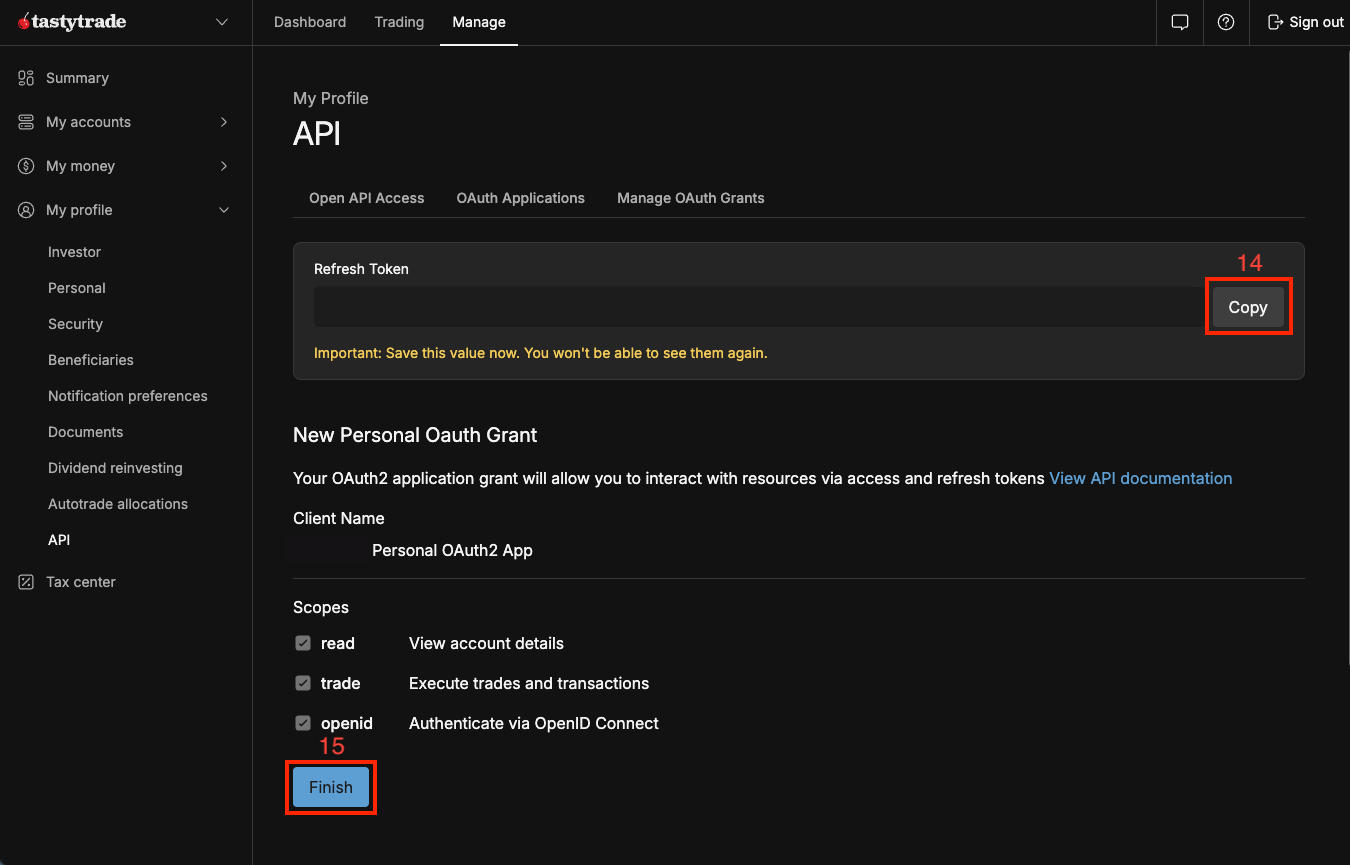
This one is also shown once, and it's the credential that matters most — it's what lets your bot keep itself logged in indefinitely. Treat it like a password.
Step 4 — Restart, then pick your account
Credentials are read once, when your bot starts, so nothing happens until you restart it. Give it 20–40 seconds.
Then, in this app:
- On the Strategies page, TastyTrade in the Broker card stops saying Not set up and becomes a broker you can pick.
- Set your TastyTrade Account Number in the Account Settings card — the list is pulled from the login you connected. See Choosing Your Trading Account.
Your strategies, filters, sizing and killswitches are account-wide and don't change when you connect a broker. For the switch itself, and what carries over, see Choosing Your Broker.
What you get on tastytrade
| Single-leg calls and puts | ✅ |
| Spreads (verticals, condors, butterflies) | ✅ The only options broker of ours that does these |
| Take-profit and stop-loss | ✅ Both rest at the broker, as one bracket |
| Trailing stops, multi-tier trailing | ✅ |
| Up to 4 exit legs on one position | ✅ |
| Futures | ❌ Use Plus500, Tradovate or Paper |
The bracket is the real difference from Robinhood. Because tastytrade holds both sides of it, your stop and your target survive your bot restarting or going offline. On Robinhood only the stop rests at the broker and the target is watched by the bot — see Trading on Robinhood if you're comparing the two.
Fees
tastytrade charges $1.00 per contract to open and nothing to close on options, plus the usual regulatory fees. Those are wrapped into the trade cost your P&L pages show, so what you see in a trade is what you keep. See Fees & Slippage.
If something looks wrong
- TastyTrade still says Not set up. The bot hasn't restarted since you set the credentials, or one of the three is missing. They're read at startup only.
- It says Credentials not configured. Your bot can see some of the set but not all three. The usual cause is a stray space or a newline picked up with a copy-paste — re-paste the one you're least sure of.
- It's selected but nothing trades. Check your TastyTrade Account Number is set. Without it the bot has nowhere to send an order, and that's silent rather than loud.
- It worked and then stopped. A grant can be revoked at tastytrade, and deleting the OAuth client revokes it too. Create a new grant and set a fresh refresh token.
Note
Still stuck after a restart? Your bot may need an update before it can use a broker — contact support rather than re-doing these steps.